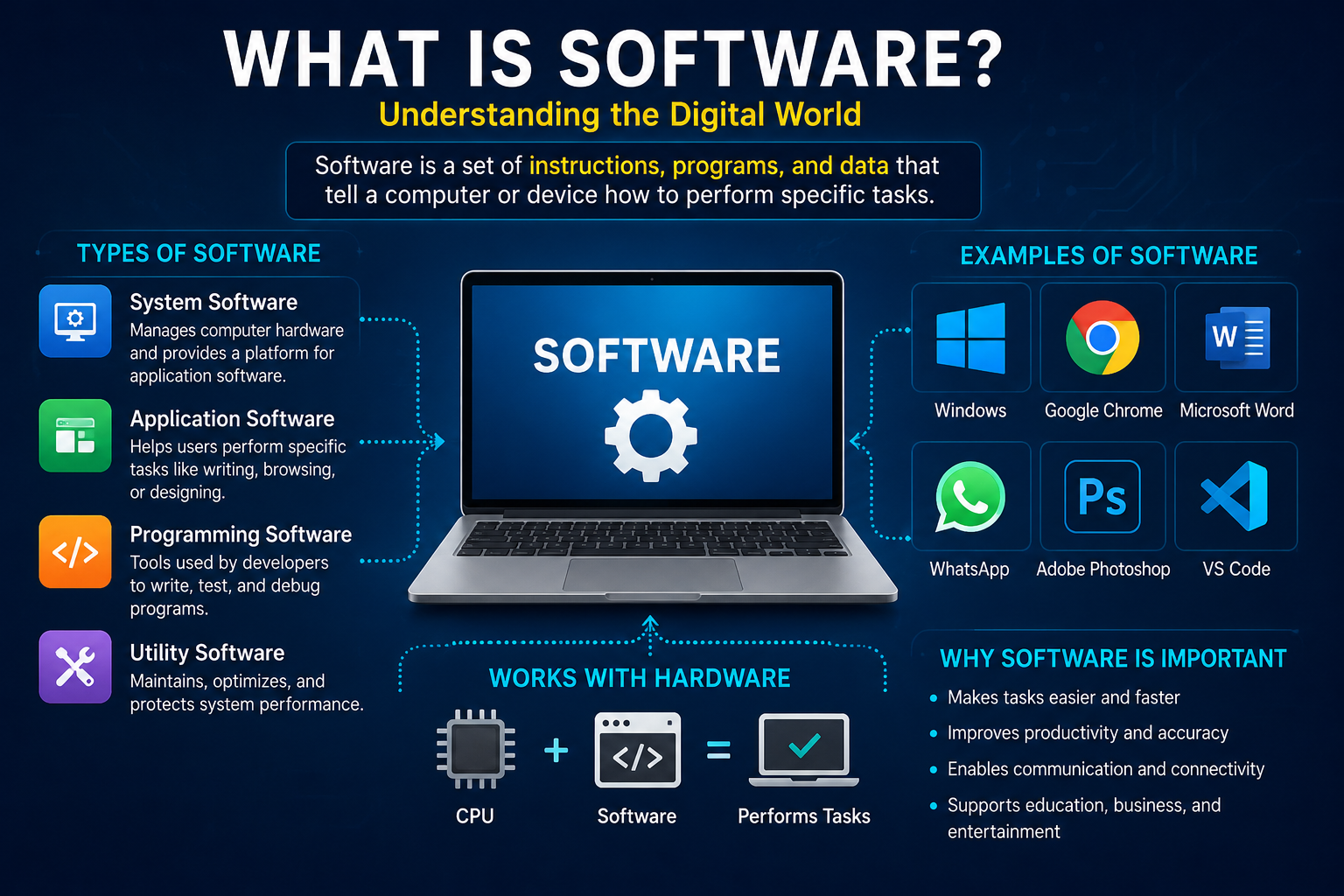
Whats Software When people search for whats software, they usually want to understand what software means, how it works, and why it is important. In simple terms, software is a collection of computer programs, instructions, and related data that tells a computer, smartphone, or another digital device what to do. Unlike hardware, which includes physical components such as a keyboard, screen, processor, and storage drive, software is primarily digital. You cannot normally touch software as you would touch a computer mouse, but you can interact with it through applications, menus, buttons, and other interfaces. The National Institute of Standards and Technology describes software as computer programs and associated data, helping explain why software is essential to the operation of modern information systems.
Think about your daily routine. You might use WhatsApp to send messages, Google Chrome to browse websites, Microsoft Word to write documents, or a banking app to transfer money. Each of these applications is software designed to perform specific tasks. Your smartphone would have limited usefulness without an operating system and applications, just as a laptop would be far less practical without programs that help you work, study, communicate, and enjoy entertainment. Software transforms electronic devices from collections of physical components into useful tools that solve real problems. Understanding the meaning of software can help students, professionals, business owners, and everyday internet users make better technology decisions.
How Software Works
Software works by providing instructions that a device’s processor and other components can execute. Developers write programs using programming languages, organize the instructions into applications or system components, and test them to ensure they behave as expected. When you open an application, the operating system helps load the necessary program components into memory and provides access to resources such as storage, networking, and the display. The software then processes your actions, handles information, and produces results, such as displaying a document, playing a video, or sending a message. Some programs operate locally on your device, while others communicate with remote servers to access online services and stored information.
For example, when you open an online shopping application, the interface displays products, your selections are processed, and the application may contact a server to retrieve prices and stock information. When you complete a purchase, additional software handles payment processing, order records, and delivery information. Several software components may work together behind the scenes, even though you see only one simple screen. This cooperation is one reason software engineering requires careful planning, testing, maintenance, and security.
Why Is Software Important in Everyday Life?
Software plays a major role in communication, education, healthcare, business, transportation, entertainment, and financial services. Messaging applications let people communicate across countries, video conferencing tools support remote work, and learning platforms help students access educational resources from home. In healthcare, specialized programs can help authorized professionals manage appointments, review medical information, and organize clinical workflows. Businesses use software to track sales, manage inventory, communicate with customers, prepare reports, and reduce repetitive administrative work. Without software, many of these activities would require considerably more manual effort and could become harder to coordinate.
Software also helps individuals organize their personal lives. Calendar applications provide reminders, navigation tools suggest routes, and budgeting programs help users review expenses. Creative applications allow people to edit photos, produce videos, design graphics, and publish content online. For small businesses, the right software can make everyday operations more organized without requiring a large team. However, the real benefit depends on choosing a tool that matches the user’s needs, budget, technical abilities, and privacy requirements. Software is most valuable when it solves a genuine problem rather than adding unnecessary complexity.
What Are the Main Types of Software?
Software can be classified in several ways depending on its purpose, how it runs, and who uses it. The most common introductory categories are system software, application software, programming software, and utility software. These categories sometimes overlap because modern programs often combine several functions. For instance, an application may include security features, use system libraries, and connect to cloud services. Understanding the main categories makes it easier to identify which kind of software is suitable for a particular task.
1. System Software
System software manages the basic operations of a computer or another digital device. It provides the environment in which applications run and helps coordinate resources such as memory, processors, storage, and connected devices. Operating systems are the best-known examples of system software. Microsoft Windows, macOS, Linux, Android, and Apple’s iOS all provide core services that allow users and applications to interact with device hardware. Without an operating system or an equivalent software environment, using a general-purpose computer would be far more difficult.
System software can also include device drivers, firmware, and other low-level components. Drivers help an operating system communicate with hardware such as printers, graphics cards, and audio devices. Firmware provides instructions for specific hardware functions and is often stored in non-volatile memory. Although these components may operate largely in the background, they are essential to reliable device performance. Keeping operating systems and important system components updated can improve compatibility, stability, and security.
2. Application Software
Application software helps users complete particular tasks. It includes word processors, web browsers, spreadsheets, photo editors, communication tools, accounting programs, and mobile applications. Unlike system software, which focuses on managing a device, application software is usually designed around the user’s immediate goals. A student might use a word processor to prepare an assignment, while a shop owner might use a point-of-sale application to record transactions. Different applications serve different audiences, and many offer both free and paid versions.
Application software can be installed on a device or accessed through a web browser. Traditional desktop applications often perform much of their work locally, whereas web applications commonly rely on internet connections and remote services. Some modern applications combine both approaches, allowing users to continue certain tasks offline and synchronize their information later. Popular examples include Google Docs, Microsoft Excel, Adobe Photoshop, Zoom, and many online project management platforms. When choosing an application, users should consider its features, ease of use, compatibility, pricing, and data-handling policies.
3. Programming Software
Programming software helps developers create, test, debug, and maintain other software. This category includes code editors, integrated development environments, compilers, interpreters, debuggers, and version-control tools. Visual Studio Code, Visual Studio, and Git-based development workflows are examples of tools used in software development. These tools make it easier to write instructions, identify errors, manage changes, and collaborate with other developers. Some tools specialize in a particular programming language, while others support many languages and development frameworks.
Programming software is becoming more accessible because artificial intelligence can now assist with tasks such as explaining code, generating draft functions, and suggesting possible fixes. However, AI-generated code still requires human review, testing, and security checks. Developers must ensure that programs behave correctly, protect sensitive information, and remain maintainable as requirements change. Good development tools can speed up the process, but they cannot replace careful engineering practices. The goal is to create software that works reliably for real users, not simply to produce code quickly.
4. Utility Software
Utility software helps maintain, protect, analyze, or optimize a computer system. Examples include backup applications, file compression tools, disk management utilities, antivirus software, and certain diagnostic programs. These tools often support the operating system and help users handle specific maintenance tasks. A backup utility, for instance, can create copies of important files so that they can be recovered after accidental deletion or a device failure. Security utilities can also help detect suspicious files and identify potential threats.
Utilities are particularly helpful when used as part of a sensible maintenance routine. Users should download them from trusted developers, review the permissions they request, and avoid programs that promise unrealistic performance improvements. Installing too many overlapping tools may create unnecessary notifications, consume system resources, or introduce new security risks. A well-maintained device generally needs reliable updates, adequate storage, regular backups, and appropriate security protection rather than a large collection of questionable optimization applications.
Common Examples of Software
Software is used in almost every digital activity, from sending a quick message to managing a large international business. The following table shows common software examples and the tasks they support. These examples are useful for beginners who want to understand the practical meaning of software rather than learning only a technical definition.
| Software category | Examples | Main purpose |
|---|---|---|
| Operating systems | Windows, macOS, Linux | Manage device resources |
| Communication | WhatsApp, Zoom | Messaging and video calls |
| Office productivity | Microsoft Word, Google Docs | Create documents |
| Spreadsheets | Microsoft Excel, Google Sheets | Analyze and organize data |
| Graphic design | Adobe Photoshop, Canva | Create and edit visuals |
| Web browsing | Google Chrome, Firefox | Access websites |
| Accounting | QuickBooks, Xero | Manage financial records |
| Cybersecurity | Microsoft Defender, Bitdefender | Help protect devices |
| Programming | Visual Studio Code, Visual Studio | Develop software |
| Artificial intelligence | ChatGPT and AI-enabled applications | Assist with tasks and information processing |
The table includes examples from different categories, but not every product has the same features, pricing, or privacy practices. Some tools are free, some require subscriptions, and others charge based on usage. Certain applications also combine multiple categories. For example, a modern business platform might include accounting, customer relationship management, automated reporting, and AI-powered assistance in one product. Before selecting any software, check whether it supports your device, whether the required features are included in the plan, and whether the provider offers suitable customer support.
How Software Works With Hardware
Software and hardware are two essential parts of a functioning digital system. Hardware refers to physical components, including processors, memory chips, storage devices, screens, and networking equipment. Software supplies the instructions that allow those components to perform useful tasks. Imagine hardware as the instruments in an orchestra and software as the written music and directions that coordinate them. The instruments provide the physical capabilities, but the instructions determine what happens and how the different parts work together.
When you type a message, your keyboard sends input to the computer, and the operating system helps the active application receive it. The application processes your keystrokes and displays the text on your screen. If you save the document, software communicates with the storage system to write the information to a file. If you send it through an online service, networking software and other system components help transmit the data. These steps happen quickly, making the process appear effortless even though several components cooperate in the background.
Software performance also depends partly on hardware capabilities. A demanding video editor may require more memory and processing power than a simple text editor. Similarly, artificial intelligence applications that run directly on a device may benefit from specialized processors, while cloud-based AI tools can perform much of their computation on remote servers. This means upgrading software does not always solve a slow-device problem. Users should consider available storage, memory, processor performance, network quality, and application requirements before deciding whether to update software or replace hardware.
The Benefits of Using Software
One of the biggest benefits of software is efficiency. Tasks that once required repetitive manual work can often be completed with a few clicks or automated workflows. A small business can use accounting software to organize invoices, a teacher can use learning software to distribute assignments, and a content creator can use editing software to prepare videos. Automation can also reduce routine mistakes when processes are properly configured and checked. By handling repetitive activities, software gives people more time to focus on decisions, creativity, customer service, and other work that requires human judgment.
Another important benefit is access to information. Search engines, educational platforms, digital libraries, and collaboration applications allow people to find resources and share information across geographical boundaries. Cloud-based software makes it possible for teams to work on shared documents without always being in the same office. Version history and permission settings can help teams coordinate changes and control who can access particular files. These capabilities are especially useful for remote workers, students, freelancers, and businesses with distributed teams. However, their value depends on dependable internet access, sensible account security, and clear working practices.
Software can also support better decisions by turning raw information into reports, charts, and useful summaries. A retailer might analyze sales records to identify popular products, while a marketing team could review campaign results to understand which channels attract customers. AI-enabled tools can assist with summarization, drafting, classification, and other data-related tasks. Yet software outputs are not automatically correct. Inaccurate source data, poorly configured systems, or flawed assumptions can produce misleading results, so users should validate important information before acting on it.
The Latest Software Trends in 2026
Software continues to evolve as developers respond to changing user expectations, business needs, and security challenges. In 2026, artificial intelligence, AI-assisted development, automated agents, and stronger cybersecurity controls are prominent themes in the industry. Deloitte’s 2026 software industry outlook discusses the movement toward AI-first products and increased competition from companies building around AI from the beginning. Gartner’s technology trends for 2026 also highlight AI-native development platforms, multiagent systems, and AI security platforms. These developments suggest that software is becoming more capable, but also more demanding to manage responsibly.
Artificial Intelligence Software
AI software uses techniques such as machine learning and generative AI to perform tasks that traditionally required more manual effort. Depending on the product, these tasks can include generating text, summarizing documents, analyzing data, producing images, answering questions, and assisting with programming. Students may use AI tools to understand complex subjects, while businesses may use them to draft content, organize information, or support customer service. AI capabilities are also being added to existing office applications, design tools, search services, and business platforms.
However, AI software should be treated as an assistant rather than an unquestionable authority. A tool may produce inaccurate statements, invent details, misunderstand instructions, or generate content that requires substantial editing. Users should verify facts, protect confidential information, and follow the rules that apply to their work or studies. Businesses should also consider how AI tools handle submitted data and whether their terms allow the intended use. The most effective approach combines the speed of automation with human review and accountability.
Cloud-Based Software
Cloud-based software allows users to access applications and services over the internet, often without installing the full application on every device. Email services, online document editors, cloud storage, and many customer management systems use this model. Updates can be delivered centrally, and teams can often access shared information from different locations. Cloud services may also make it easier for a small business to begin using professional tools without purchasing and maintaining its own server infrastructure.
There are trade-offs. Cloud applications may depend on a stable internet connection, and recurring subscriptions can become expensive as a company grows. Organizations must understand where their data is stored, who can access it, how backups work, and what happens if they change providers. A business should also consider service availability and whether it can export its data in a usable format. Choosing cloud software is not simply a question of convenience; it is also a decision about cost, control, reliability, and privacy.
Automation and AI Agents
Traditional automation follows predefined rules, such as sending an invoice reminder after a particular date or transferring information between connected applications. AI agents can go a step further by using AI models and software tools to pursue a defined goal through multiple steps. For example, a business might experiment with an agent that gathers information from approved sources, prepares a draft report, and sends it for human approval. The exact abilities depend on the system, its integrations, and the permissions it receives.
This trend creates opportunities to reduce repetitive work, but it introduces new risks. An agent with excessive permissions could access information it does not need or take an action that was not intended. Organizations should define clear limits, monitor activity, test unusual scenarios, and require human approval for high-impact actions. Gartner identifies oversight of AI agents as an important cybersecurity concern in 2026, reinforcing the need for governance alongside innovation.
Low-Code and No-Code Software
Low-code and no-code platforms help users create applications with visual interfaces, reusable components, templates, and workflow builders. Instead of writing every line of code manually, a user may configure forms, connect data sources, and define actions through a graphical editor. These platforms can help small businesses build internal dashboards, simple booking systems, approval workflows, or basic customer portals. They can also allow technical teams to produce prototypes more quickly.
These platforms are not a universal replacement for professional software development. Complex applications may require custom programming, careful performance testing, detailed security controls, and long-term maintenance. Businesses should also examine licensing limits, integration options, data export capabilities, and the risk of becoming too dependent on a single vendor. Low-code tools work best when their strengths match the problem being solved and when someone remains responsible for the resulting application.
Cybersecurity and Privacy-Focused Software
As software becomes more connected and AI tools gain access to additional information, security is an increasingly important part of software selection and development. Organizations need to consider identity management, access controls, secure updates, data protection, and monitoring for suspicious activity. Gartner’s 2026 cybersecurity guidance highlights challenges involving AI agents, unmanaged AI use, and the need for stronger governance. This means security cannot be treated as an optional feature added only after an application has been built.
Individuals can improve their safety by using unique passwords, enabling multifactor authentication where available, installing updates from trusted sources, and keeping backups of important files. Businesses should limit employee access to information based on job responsibilities and review third-party services before connecting them to sensitive systems. They should also establish procedures for reporting incidents and recovering from data loss. Good security requires several layers of protection, because even a well-designed application can be exposed by a compromised account, an unsafe configuration, or a careless user.
How to Choose the Right Software
Choosing the right software starts with understanding what you want to accomplish. Before comparing products, identify the problem you need to solve, the features you actually require, and the people who will use the tool. A student who needs to write assignments may only need a document editor, while a digital marketing agency may require tools for keyword research, content planning, analytics, and collaboration. Buying the most expensive product does not guarantee the best results. The best software is the one that delivers useful features without creating unnecessary costs or complexity.
Next, compare usability, pricing, compatibility, customer support, and security. Check whether the application works with your operating system, whether it supports the file formats you use, and whether its free plan includes the features you need. If the product handles sensitive information, read its privacy policy and review its access permissions. For business software, consider how well it integrates with your existing systems and whether you can export your information if you change providers. A free trial or limited pilot can help you test the application before committing to a long-term subscription.
| Selection factor | What to check |
|---|---|
| Features | Does it solve your main problem? |
| Price | Are subscription fees and extra charges affordable? |
| Ease of use | Can you learn it without extensive training? |
| Compatibility | Does it work with your devices and other tools? |
| Security | Does it provide suitable access controls and protection? |
| Support | Are help resources and technical assistance available? |
| Scalability | Can it support your needs as they grow? |
| Data portability | Can you export your files and information? |
For CloudMagz.com readers interested in technology, AI tools, and digital productivity, comparing software carefully can help avoid wasted spending. Start with one tool, test it against a clear goal, and measure whether it saves time or improves your results. If it does not deliver meaningful value, explore alternatives before expanding its use. A simple, reliable tool that you understand is often more useful than a complicated platform filled with features you rarely use.
Software Security and Common Risks
Software offers many advantages, but it can also introduce problems when it is poorly designed, outdated, or obtained from untrustworthy sources. Malware, ransomware, spyware, and malicious browser extensions can compromise devices or expose private information. Some applications request more permissions than they need, while others may collect information that users do not expect. Fake download pages and misleading advertisements can also encourage people to install unwanted programs. Understanding these risks helps users make safer choices without becoming afraid of technology.
One important precaution is to download software through official websites or trusted application stores. Keep your operating system, browser, and applications updated, because security patches can address vulnerabilities discovered after a product is released. Use multifactor authentication for important accounts, avoid opening suspicious attachments, and maintain backups that are protected against unauthorized changes. If a program requests access to contacts, files, location, or a camera, consider whether those permissions are genuinely necessary for its intended purpose.
Businesses need additional safeguards because a software incident can affect customers, employees, revenue, and operations. Organizations should maintain an inventory of their applications, remove unnecessary accounts, review third-party integrations, and establish procedures for handling security incidents. They should also test backups and confirm that recovery procedures work before an emergency occurs. AI-powered development 7 tools introduce another consideration: generated code must be reviewed and tested rather than trusted automatically. Responsible software use combines technical safeguards, clear policies, regular maintenance, and informed decisions.
The Future of Software
The future of software will likely involve more intelligent assistance, more automation, and closer integration between applications. Rather than requiring users to navigate every menu manually, some systems will allow people to describe a goal and receive help completing multiple steps. Developers will continue exploring AI-assisted programming, specialized models, and tools that help create applications more efficiently. Research and industry outlooks for 2026 reflect this direction, although the speed and impact of adoption will vary across sectors.
At the same time, reliability, privacy, and human oversight will remain essential. Software that performs complex tasks must be tested against real-world situations, including unexpected inputs and system failures. Companies will need to balance convenience with control, particularly when applications handle financial transactions, customer information, or other sensitive data. Users will also need practical digital skills to recognize unreliable outputs and understand how their information is used. The most successful software will not necessarily be the software with the most features; it will be the software that solves real problems safely and consistently.
Conclusion
Understanding whats software means understanding the programs and digital systems that make modern devices useful. Software includes operating systems, everyday applications, development tools, utilities, and increasingly sophisticated AI-powered services. Each category serves a different purpose, but they all help people process information, communicate, create content, manage businesses, and complete tasks more efficiently.
In 2026, AI, cloud computing, automation, and cybersecurity are shaping how software is developed and used. These developments create new opportunities for students, professionals, entrepreneurs, and technology enthusiasts, but they also make informed software selection more important. Before choosing a tool, consider its purpose, price, compatibility, security, and ease of use. By understanding the basics and keeping up with meaningful technology developments, you can make smarter decisions and get more value from the software you use every day.
For more guides about AI applications, digital tools, and technology trends, visit CloudMagz.com.
Frequently Asked Questions (FAQs)
1. What is software in simple words?
Software is a collection of programs and instructions that tells a computer, smartphone, or another digital device how to perform tasks. Examples include web browsers, messaging applications, games, operating systems, and office programs. Software works with hardware to make digital devices useful.
2. What are the four main types of software?
Four common categories are system software, application software, programming software, and utility software. System software manages device operations, application software helps users complete tasks, programming software supports software development, and utility software helps maintain or protect devices.
3. What are some examples of software?
Common examples include Windows, macOS, Google Chrome, Microsoft Word, Microsoft Excel, WhatsApp, Adobe Photoshop, and Visual Studio Code. Each product has a different purpose, ranging from operating a computer and communicating online to editing images and creating programs.
4. What is the difference between software and hardware?
Hardware consists of physical components, such as a processor, keyboard, screen, and storage drive. Software consists of programs and associated data that provide instructions for the device. Both work together to perform tasks, display information, and process user input.
5. What are the latest software trends in 2026?
Important software trends in 2026 include AI-powered applications, AI-assisted development, autonomous or semi-autonomous AI agents, low-code development platforms, cloud-based services, and stronger cybersecurity controls. The most suitable technology depends on the user’s requirements, budget, and security needs.