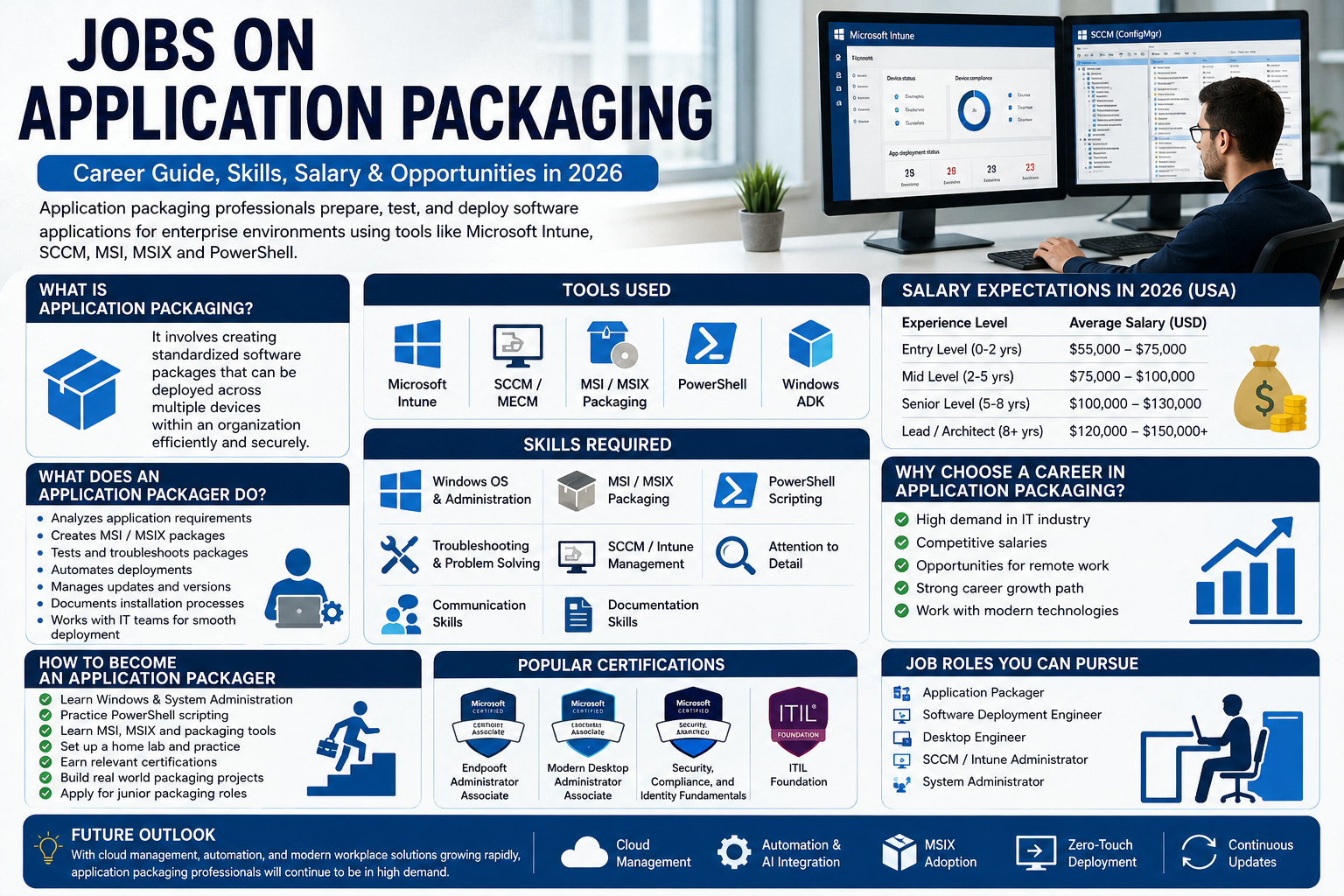
Application packaging has become an essential part of enterprise IT because companies use platforms like Microsoft Intune, Microsoft Endpoint Configuration Manager (formerly SCCM), and Windows Installer technologies to manage software efficiently. Whether you’re an experienced IT professional or someone looking for a new technology career, application packaging offers competitive salaries, remote work opportunities, and long-term career growth.
This guide explains everything you need to know about becoming an application packager in 2026, including required skills, tools, certifications, salaries, and career opportunities.
What Are Jobs on Application Packaging?
Application packaging jobs involve preparing software applications for deployment within an organization. Instead of simply installing a program, an application packager creates standardized installation packages that work consistently across multiple devices.
Think of it like preparing identical gift boxes. Rather than wrapping each gift separately every time, you create one perfect package that can be delivered repeatedly without errors. That’s exactly what application packagers do with software.
Large companies rely on packaged applications because they help:
-
Reduce installation errors
-
Save IT support time
-
Improve security
-
Standardize software configurations
-
Simplify software updates
Common industries hiring application packaging professionals include finance, healthcare, government, manufacturing, retail, and technology companies.
What Does an Application Packager Do?
An application packager is responsible for creating, testing, troubleshooting, and maintaining software installation packages. Their work ensures employees receive applications that install correctly without disrupting business operations.
Daily Responsibilities
A typical day may include analyzing installation files, creating MSI or MSIX packages, testing deployments, and documenting installation procedures. Professionals also work closely with IT administrators to resolve deployment issues and ensure software remains compatible with Windows environments.
Many organizations require application packagers to collaborate with cybersecurity teams, desktop support teams, and cloud administrators.
Typical responsibilities include:
-
Creating MSI and MSIX packages
-
Repackaging legacy software
-
Testing installations
-
Troubleshooting deployment failures
-
Managing application updates
-
Documenting packaging procedures
-
Supporting enterprise software deployment
Attention to detail is critical because even a small packaging mistake can affect hundreds of computers.
Tools Used in Application Packaging
Application packagers use specialized software to build and deploy installation packages.
Microsoft Intune
Cloud-based app deployment
SCCM / MECM
Enterprise software management
MSI & MSIX
Windows package formats
PowerShell
Automation and scripting
PowerShell has become especially valuable because companies increasingly automate repetitive deployment tasks.
Skills Required for Application Packaging Jobs
Success in application packaging requires both technical knowledge and problem-solving abilities. While many professionals start with desktop support or system administration experience, they gradually develop packaging expertise through hands-on practice.
Important technical skills include:
-
Windows operating systems
-
Microsoft Intune
-
SCCM/MECM
-
MSI packaging
-
MSIX packaging
-
PowerShell scripting
-
Application troubleshooting
-
Registry editing
-
File system management
Soft skills matter just as much.
Good application packagers need:
-
Strong communication
-
Analytical thinking
-
Documentation skills
-
Time management
-
Attention to detail
-
Team collaboration
Employers often value candidates who can explain technical problems clearly to non-technical stakeholders.
Certifications That Can Improve Your Career
Certifications can strengthen your resume and demonstrate practical knowledge to employers.
Popular certifications include:
-
Microsoft Certified: Endpoint Administrator Associate
-
Microsoft 365 Certified
-
Windows Client Certifications
-
PowerShell Automation Training
-
ITIL Foundation
While certifications alone won’t guarantee a job, they often help candidates stand out during hiring.
Many professionals combine certifications with home lab experience using virtual machines.
Salary Expectations in 2026
Application packaging is generally considered a well-paying IT specialization. Salaries vary depending on experience, location, certifications, and whether the position is remote.
| Experience | Estimated Annual Salary |
|---|---|
| Entry Level | $55,000–$75,000 |
| Mid-Level | $75,000–$100,000 |
| Senior Packager | $100,000–$130,000+ |
| Lead/Architect | $120,000–$150,000+ |
Remote positions often provide additional flexibility, although compensation depends on company policies and location.
Contract positions can sometimes offer higher hourly rates for experienced professionals.
Remote Application Packaging Jobs
Remote work has expanded opportunities for application packaging professionals because much of the work involves cloud platforms and remote device management.
Many companies now hire remote specialists for:
-
Microsoft Intune administration
-
SCCM support
-
Software deployment
-
Enterprise application packaging
-
Endpoint management
Popular places to search include:
-
LinkedIn Jobs
-
Indeed
-
Glassdoor
-
Dice
-
Remote.co
-
Company career websites
Remote roles usually require good communication skills because teams collaborate through online meetings and documentation.
How to Become an Application Packager
Breaking into application packaging doesn’t necessarily require a computer science degree. Many professionals transition from desktop support, help desk, or system administration roles.
A practical roadmap includes:
-
Learn Windows administration.
-
Practice PowerShell scripting.
-
Build a home virtual lab.
-
Learn MSI and MSIX packaging.
-
Practice with Microsoft Intune.
-
Earn relevant certifications.
-
Create a portfolio of packaging projects.
-
Apply for junior packaging roles.
A home lab using VirtualBox or Hyper-V can provide valuable hands-on experience.
Employers often appreciate candidates who can demonstrate real-world practice rather than relying only on theoretical knowledge.
Common Challenges in Application Packaging
Like every IT career, application packaging comes with challenges.
Common issues include:
-
Legacy software compatibility
-
Installation conflicts
-
Silent installation failures
-
Permission problems
-
Dependency management
-
Version control
Successful professionals develop systematic troubleshooting methods instead of relying on guesswork.
Careful testing before deployment helps prevent problems from reaching end users.
Future of Application Packaging
The future of application packaging looks promising as organizations continue moving toward cloud-based endpoint management and automation.
Major trends include:
-
AI-assisted deployment
-
Increased Intune adoption
-
MSIX package growth
-
Zero-touch provisioning
-
Automated software updates
-
Cloud-native management
Artificial intelligence is expected to help automate repetitive packaging tasks, but human expertise remains essential for testing, troubleshooting, and security validation.
As businesses expand hybrid work environments, demand for skilled packaging professionals is likely to remain strong.
Conclusion
Jobs on application packaging offer an excellent career path for IT professionals interested in software deployment, automation, and endpoint management. Companies increasingly rely on experts who can package applications efficiently using Microsoft Intune, SCCM, MSI, MSIX, and PowerShell.
Whether you’re starting from desktop support or advancing your existing IT career, developing packaging skills, earning Microsoft certifications, and building practical experience can open doors to well-paying opportunities in 2026. As cloud management and automation continue evolving, application packaging remains a valuable specialization with strong long-term potential.
For more IT career guides, AI technology articles, and software insights, visit CloudMagz.com.
Frequently Asked Questions
1. What is an application packaging job?
An application packaging job involves preparing software applications for standardized deployment across multiple computers using tools like Microsoft Intune, SCCM, and MSI packages.
2. Do I need coding skills for application packaging?
Basic PowerShell scripting is highly beneficial, but you don’t need to be a full-time software developer. Troubleshooting and Windows administration skills are often more important.
3. Is application packaging a good career in 2026?
Yes. Enterprise organizations continue investing in cloud device management, automation, and standardized software deployment, creating ongoing demand for skilled professionals.
4. Can I work remotely as an application packager?
Yes. Many companies now offer remote and hybrid roles because packaging and deployment can often be managed through cloud-based management platforms.
5. Which certification is best for application packaging?
The Microsoft Certified: Endpoint Administrator Associate certification is one of the strongest options because it covers Microsoft Intune, device management, and enterprise deployment concepts.