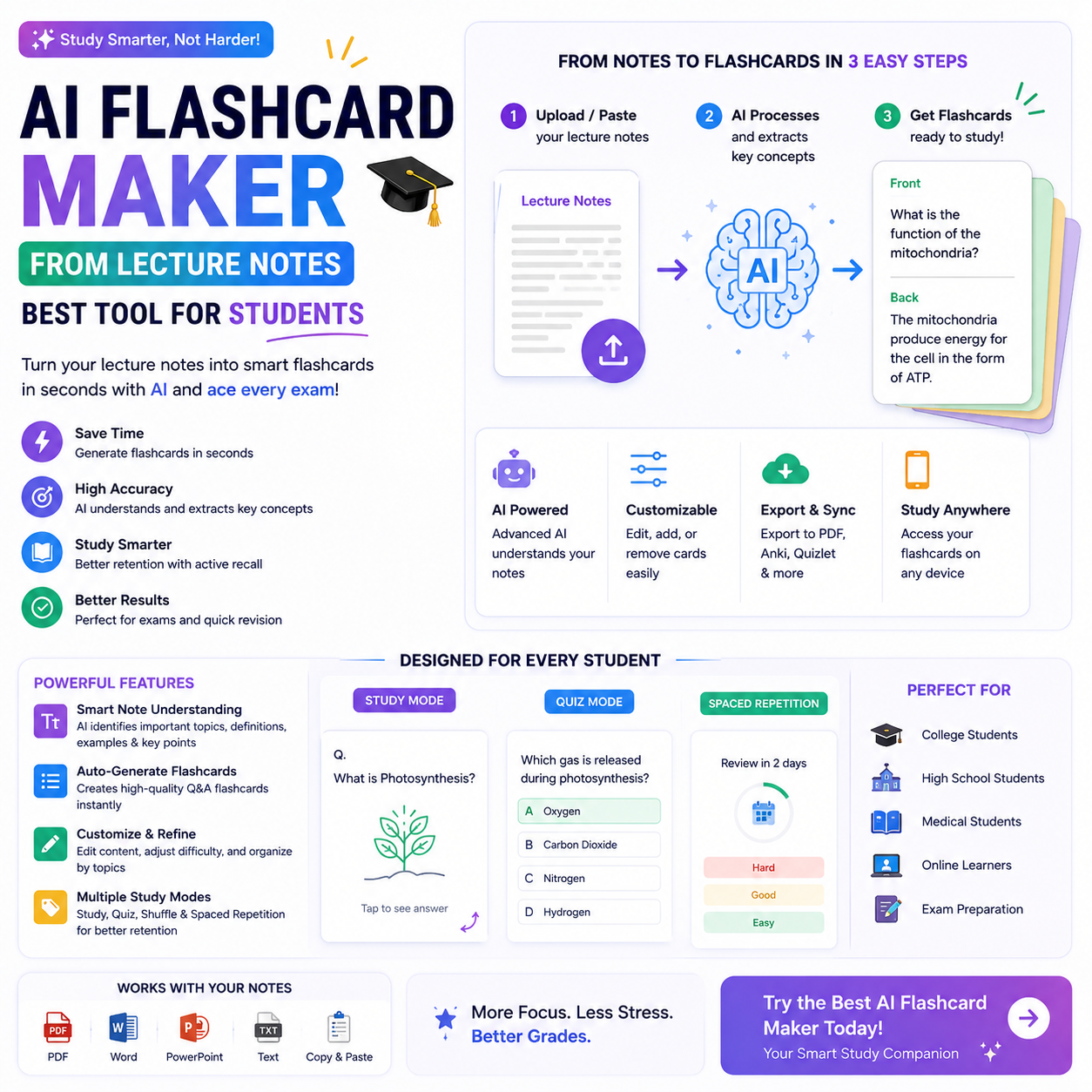
Studying from lengthy lecture notes can be challenging, especially when exams are approaching. Students often spend hours reading textbooks, highlighting important points, and writing questions by hand. An AI flashcard maker from lecture notes can simplify this process by turning study materials into question-and-answer cards automatically.
These tools use artificial intelligence to identify important concepts, definitions, facts, and explanations from your notes. Instead of creating every flashcard manually, you can generate a study set, review the questions, and focus on topics that need more attention.
Whether you are a school student, college learner, or university student, AI-powered flashcards can make your study routine more organized. In this guide, we will explore how these tools work, discuss popular options, and explain how to use flashcards effectively.
What Is an AI Flashcard Maker from Lecture Notes?
An AI flashcard maker from lecture notes is a digital learning tool that converts written study materials into flashcards using artificial intelligence.
A typical flashcard contains a question or prompt on one side and the answer on the other. For example, if your biology notes explain photosynthesis, an AI tool might generate the question, “What is photosynthesis?” and provide a short definition as the answer.
Depending on the platform, you may be able to upload PDFs, paste text, import documents, or enter notes manually. The tool then identifies important information and organizes it into cards for revision.
Some platforms also offer quizzes, spaced repetition, progress tracking, and different question formats. These features can help students review information regularly rather than trying to memorize everything in one session.
Why Should Students Use AI Flashcards?
1. Save Time Creating Study Materials
Writing dozens of flashcards manually can take a significant amount of time. AI tools can generate an initial set from existing notes, allowing students to spend more time reviewing and understanding the material.
You should still check the generated cards to ensure that important information has not been omitted.
2. Identify Important Concepts
Lecture notes often contain lengthy explanations, examples, and supporting details. An AI flashcard generator can help turn these materials into shorter questions focused on important concepts.
This makes it easier to organize revision around definitions, formulas, dates, processes, and key facts.
3. Improve Active Recall
Active recall means trying to remember information before looking at the answer. Flashcards encourage this process by presenting a question first.
Instead of repeatedly reading your notes, you attempt to answer each question from memory and then check whether your response is correct.
4. Support Spaced Repetition
Spaced repetition involves reviewing information at increasing intervals. Some flashcard platforms use your performance to help schedule future reviews.
This method can support long-term retention when used consistently. However, flashcards work best alongside explanation, practice questions, and a broader understanding of the subject.
5. Study on Different Devices
Many digital flashcard tools work on computers, tablets, or smartphones. This flexibility allows students to review their cards during short breaks or while preparing for an upcoming test.
7 Best AI Flashcard Makers for Lecture Notes
The following tools offer different approaches to digital flashcards and AI-assisted studying. Features, upload options, and free-plan limits can change, so check each platform before choosing it.
1. Quizlet
Quizlet is a popular study platform that lets users create flashcard sets and practice learning materials in different ways. Its AI-powered study features may help transform study content into practice materials, depending on the current plan.
Students can use flashcards to review definitions, vocabulary, and important concepts.
Best for: Students who want flashcards and additional study activities in one platform.
Website: https://quizlet.com/
2. Knowt
Knowt focuses on digital notes, flashcards, and study activities. Its AI features can help students turn learning materials into flashcards and practice questions.
Depending on the supported format and current plan, students may be able to use uploaded notes or other study resources to build revision materials.
Best for: Students who want to create flashcards from existing study notes.
Website: https://knowt.com/
3. StudyFetch
StudyFetch provides AI-assisted study tools designed to help students work with learning materials. Its features may include generating flashcards and quizzes from supported documents or notes.
Students can explore its available tools to determine whether they match their course requirements.
Best for: Learners who want several AI-assisted study features together.
Website: https://www.studyfetch.com/
4. Gizmo
Gizmo is a learning platform focused on flashcards and interactive study activities. Its features can help students practice recalling information and reviewing study materials.
Check its current import and AI-generation options to see whether they support your lecture-note format.
Best for: Students who prefer interactive revision and repeated practice.
Website: https://gizmo.ai/
5. Anki
Anki is a well-known flashcard application that supports spaced repetition. Students can create their own cards or use compatible tools and workflows to prepare study sets.
Anki is not primarily an automatic AI lecture-note converter, but it can be useful when you want flexible flashcards and detailed control over review scheduling.
Best for: Students who need long-term memorization and customizable review schedules.
Website: https://apps.ankiweb.net/
6. RemNote
RemNote combines note-taking with flashcards and spaced repetition. It helps students connect study notes with review materials, making it useful for organizing information across a course.
Available AI features and usage limits depend on the current plan.
Best for: University students who want to connect notes and flashcards in one workspace.
Website: https://www.remnote.com/
7. Brainscape
Brainscape is a digital flashcard platform built around structured review and confidence-based learning. Students can create flashcards and use repeated practice to reinforce important concepts.
Its workflow may be particularly useful for subjects that require memorizing terminology, facts, or detailed information.
Best for: Students who want a structured flashcard-based revision routine.
Website: https://www.brainscape.com/
How to Make Flashcards from Lecture Notes Using AI
Creating a useful flashcard set usually requires only a few steps.
Step 1: Collect Your Lecture Notes
Gather the notes you want to study. These may include typed documents, lecture summaries, textbook extracts, or PDFs, depending on what your chosen tool accepts.
Make sure the material is readable and organized before uploading it.
Step 2: Upload Your Notes or Paste the Text
Open the flashcard tool and look for its document import, note conversion, or AI study feature.
If file uploads are not supported, copy a manageable section of your notes into the tool.
Step 3: Generate Flashcards
Choose the option to create flashcards or study questions. If the platform supports instructions, ask it to focus on important definitions, processes, examples, and concepts.
For example, you could request: “Create 20 question-and-answer flashcards from these biology lecture notes. Keep the answers concise and preserve scientific accuracy.”
Step 4: Review the Questions and Answers
AI-generated cards can contain mistakes, incomplete answers, or questions that are too broad. Compare the cards with your original notes and correct any errors.
For complex subjects, divide long explanations into smaller questions that test one concept at a time.
Step 5: Organize Your Flashcard Set
Create separate sets for different subjects, chapters, or lectures. Add labels or categories if the platform supports them.
Organized sets make it easier to find the right material when preparing for specific exams.
Step 6: Start Reviewing Regularly
Test yourself before revealing each answer. Mark difficult cards for additional practice and return to them later.
Use spaced repetition when available, but also solve practice questions and explain important ideas in your own words.
Tips for Creating Effective AI Flashcards
Keep Each Card Focused
A flashcard should usually test one main fact or idea. If an answer contains several unrelated paragraphs, divide it into smaller cards.
Use Clear Questions
Questions should be specific enough that you understand exactly what information you need to recall.
For example, “What are the three stages of cellular respiration?” is more useful than “Explain cellular respiration” when reviewing individual facts.
Include Examples When Necessary
Some concepts are easier to remember when connected to a real example. Add examples for difficult formulas, grammar rules, scientific processes, or theoretical concepts.
Mix Different Question Types
Use definition questions, comparison questions, step-by-step prompts, and application-based questions when appropriate. This helps you practice more than simple memorization.
Verify Important Information
Never assume that every AI-generated answer is correct. Check formulas, dates, statistics, quotations, and subject-specific explanations against reliable course materials.
Avoid Uploading Private Information
Before uploading lecture documents, check the platform’s privacy policy and your institution’s rules. Do not upload confidential research, personal student records, or restricted course materials without permission.
Are Free AI Flashcard Makers Worth Using?
Free AI flashcard makers can be useful for students who want to organize their notes without paying for another study application. However, free plans may limit the number of generations, document uploads, study sets, or advanced features.
Before choosing a tool, check whether it supports your file format, allows you to edit generated cards, offers convenient review options, and lets you export your work if needed.
A student who only needs a few flashcards each week may be satisfied with a free plan. Students with large courses or multiple exams should compare the available limits before committing to a platform.
Frequently Asked Questions
1. What is the best AI flashcard maker from lecture notes?
Knowt, Quizlet, and StudyFetch are useful options to investigate for AI-assisted study materials. Anki and RemNote are also worth considering if spaced repetition and long-term organization are important to you. The best choice depends on your study habits and required features.
2. Can AI create flashcards from PDF lecture notes?
Yes, some platforms support PDF uploads and can generate flashcards from the extracted text. However, scanned documents, diagrams, and complex mathematical notation may require additional checking or manual input.
3. Are AI flashcard makers free?
Some platforms offer free access or limited free features. AI generations, document uploads, exports, and advanced study options may be restricted, so review the current plan details.
4. Do AI flashcards help with exam preparation?
They can support exam preparation by encouraging active recall and regular revision. However, students should also practice solving problems, writing longer answers, and applying concepts to unfamiliar situations.
5. Can I edit AI-generated flashcards?
Many platforms allow users to edit questions and answers after generation. Always review the cards and adapt them to your teacher’s terminology, syllabus, and learning objectives.
6. How many flashcards should I create from one lecture?
There is no fixed number. Create enough cards to cover the important learning objectives without repeating the same information unnecessarily. A shorter, well-organized set is often easier to review than a large collection of low-value questions.
Conclusion
An AI flashcard maker from lecture notes can help students turn lengthy study materials into organized questions and answers. Tools such as Knowt, Quizlet, StudyFetch, and RemNote offer different approaches to creating and reviewing digital study materials, while Anki and Brainscape can support structured revision.
For the best results, choose a tool that fits your budget, check every generated answer, and review your cards regularly. Combine active recall and spaced repetition with practice questions and a clear understanding of your subject.
For more useful guides on artificial intelligence, productivity, and student technology, explore CloudMagz.com.
[…] is a popular video editor with automatic captioning features in supported versions and regions. Creators can generate subtitles, edit the recognized text, and customize the appearance of […]