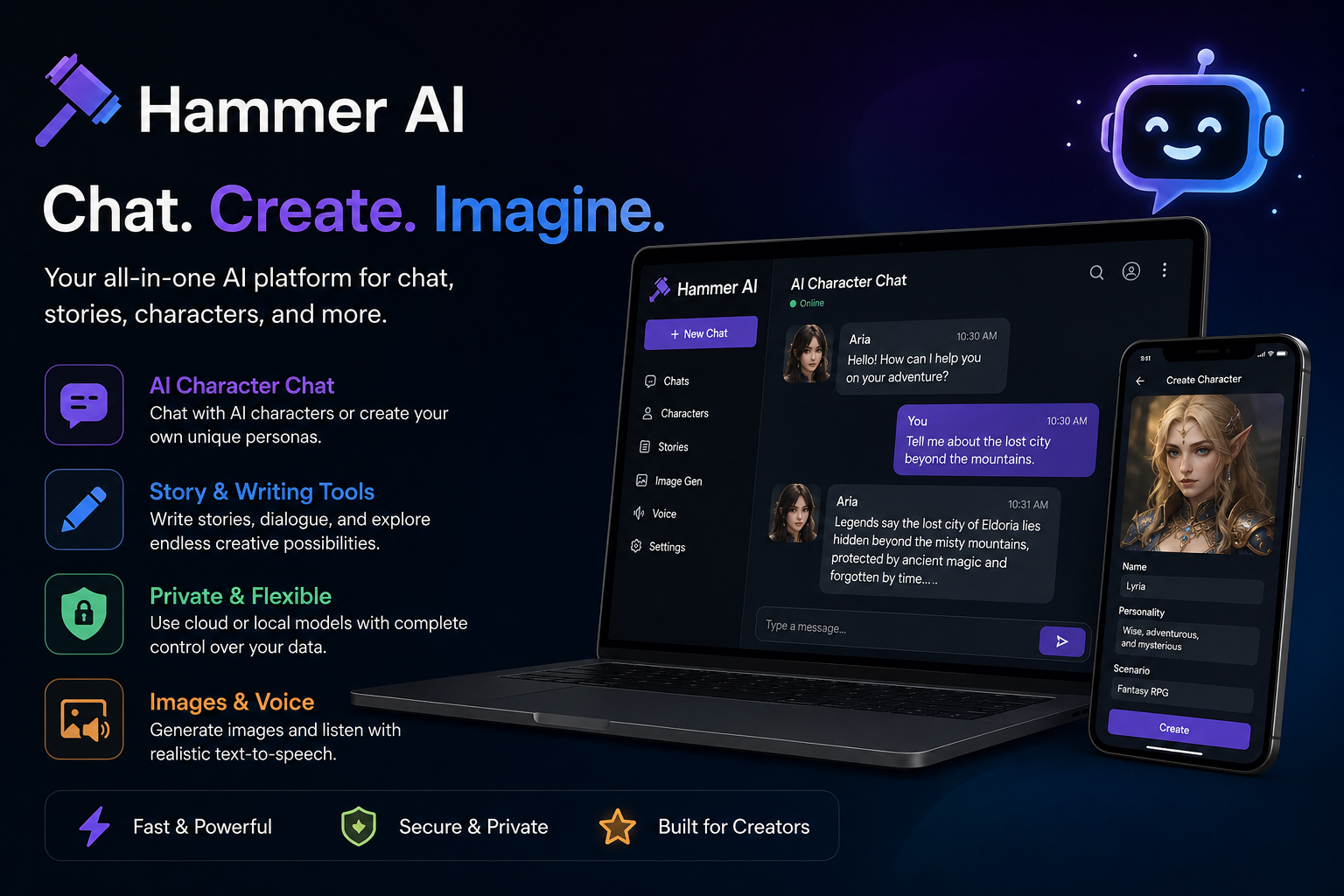
The platform offers web and desktop experiences, with mobile apps also available. Its desktop application can run compatible AI models locally on your computer, while its web experience uses cloud-based models. According to the official website, users can access free AI chat features, create stories, build character personas, and explore additional tools. Some advanced features, including cloud image generation and text-to-speech, require paid plans or credits.
For anyone researching AI tools in 2026, Hammer AI is worth understanding because it combines conversational AI with creative features. However, it is important to distinguish it from general-purpose assistants designed primarily for research, office productivity, or coding. Its suitability depends on whether you want an interactive storytelling companion, a writing aid, or a flexible environment for experimenting with AI models.
How Does Hammer AI Work?
Hammer AI uses language models to generate responses based on the messages and context provided by the user. You enter a question, describe a character, or begin a story, and the AI produces a response that helps continue the conversation. The experience can feel more interactive than a standard search engine because the system responds to your instructions and the developing context of your conversation.
The platform supports two broad approaches. Cloud models process requests through remote infrastructure, while compatible local models can run through the desktop application. Local processing can be useful for users who prefer to keep conversations on their own devices, although performance depends on the model, available memory, processor, and other hardware resources. Cloud models, meanwhile, may provide access to options that would be difficult to run locally.
This flexibility makes Hammer AI appealing to people with different technical needs. Beginners can start with browser-based chat, while experienced users can explore local models and additional configuration options. The important thing is to choose the setup that balances convenience, privacy, performance, and cost.
Top Features of Hammer AI
AI Character Chat and Roleplay
One of Hammer AI’s main attractions is its character-based conversation experience. Users can interact with existing AI characters or create personas with particular personalities, backgrounds, and communication styles. These features can make fictional conversations more engaging because responses can follow the scenario rather than remaining limited to short factual answers.
For example, a writer developing a fantasy novel could create a conversation between a detective and a mysterious witness. A game designer could test dialogue for a fictional character, while a hobbyist might explore an interactive adventure. Hammer AI also supports group conversations involving multiple characters, allowing users to experiment with more complicated scenarios.
AI Writing and Story Creation
Hammer AI can also support creative writing. Users can develop story ideas, explore alternative plots, draft dialogue, and continue fictional scenes through conversation. This can be particularly useful when a writer has an interesting concept but struggles to decide what should happen next.
Imagine planning a science-fiction story about a city where artificial intelligence controls every building. You could ask the AI to suggest conflicts, develop characters, or explore several possible endings. You remain responsible for selecting the strongest ideas, checking consistency, and refining the final text. For professional writing, it is also wise to verify facts and edit the output rather than treating every generated response as publication-ready.
Local AI Models and Privacy
Another important feature is support for local AI models through the desktop application. Rather than sending every prompt to a cloud-based model, users can download and run compatible models on their own devices. This may offer greater control over private conversations and can allow offline use once the necessary models are installed.
However, local AI is not automatically effortless. Larger models may require substantial memory and processing power, and response quality varies by model. Users should also confirm which features are running locally and which rely on remote services. This distinction matters when working with confidential information.
Image Generation and Text-to-Speech
Hammer AI offers additional creative tools through its paid plans, including cloud-based image generation and text-to-speech. These features can help users create visual material for fictional characters or turn supported text into spoken audio. The platform’s pricing page lists multiple image models and a large selection of voices and languages, with availability depending on the subscription.
For instance, a storyteller might generate a visual reference for a character and use text-to-speech to listen to dialogue. These tools can make creative projects more engaging, although users should review generated images and audio for errors, suitability, and licensing considerations before using them commercially.
Is Hammer AI Free to Use?
Yes, Hammer AI provides free access to AI chat, including local models and selected cloud models. However, free access does not mean every feature is unlimited. The official pricing page lists a free tier with a daily cloud-message allowance, a limited context window, and access to two cloud models. Paid subscriptions offer expanded model access and additional features.
The free option is a sensible starting point if you want to explore character conversations, test creative prompts, or see whether the platform fits your workflow. You can experiment before deciding whether premium features are worth paying for. If you plan to use the service frequently, check the current plan details carefully because limits and included features can change.
Hammer AI Pricing Plans
Hammer AI offers several subscription levels, with pricing displayed on its official website as follows:
| Plan | Listed price | Main benefits |
|---|---|---|
| Free | $0/month | Limited cloud access and local models |
| Starter | $9/month | More cloud models, expanded context, image and voice tools |
| Advanced | $18/month | More models, a larger context window, additional credits |
| Ultimate | $35/month | Highest listed model allowance and monthly credits |
Source: Official Hammer AI pricing page. Prices and features may change.
The paid plans also include monthly credits for image generation and text-to-speech. The official pricing page explains that these credits are used for those features, while paid cloud messaging is listed as unlimited.
Which plan should you choose? If you are a beginner, start with the free option and evaluate its response quality and limitations. Consider a paid subscription only if you regularly need its additional models, longer conversations, or creative tools. Remember to review billing and cancellation terms before subscribing.
Benefits of Using Hammer AI
One major advantage of Hammer AI is its emphasis on interactive creativity. Rather than simply producing a single answer, it can help users develop conversations, explore fictional worlds, and refine story ideas over multiple exchanges. This makes it useful for hobby writers, roleplay enthusiasts, and people who enjoy experimenting with AI-generated dialogue.
Another benefit is the choice between cloud and local models. Cloud access can make getting started easier, while local models give technically confident users greater control over how they run their conversations. The platform also brings several creative features into one environment, reducing the need to switch between separate tools for every task.
Cost is another consideration. Users can try the free tier before committing to a subscription, which is helpful when comparing AI services. Still, the best choice depends on your needs, device capabilities, and the features you actually use. A free tool that handles your everyday tasks may offer better value than a premium subscription filled with features you rarely need.
Limitations of Hammer AI
Hammer AI is not the perfect solution for every user. Its main focus on character chat and creative interaction means it may not be the best standalone choice for tasks requiring verified research, advanced office workflows, or specialized professional analysis. Generated responses can also contain inaccurate information, repetitive dialogue, or inconsistencies in longer stories.
Local model performance presents another challenge. If your computer lacks sufficient memory or processing power, some models may respond slowly or fail to run smoothly. Cloud features also depend on an internet connection, and premium capabilities may require additional spending.
Privacy deserves careful attention, too. Although local processing can help keep conversations on your device, cloud processing involves sending prompts to remote infrastructure. Read the current privacy policy and understand how each feature handles data before entering sensitive information.
How to Get Started With Hammer AI
Getting started is straightforward. Visit the official Hammer AI website and explore the available chat features. If you prefer using a desktop application, check the supported downloads for your operating system. Mobile users can also find the app through the relevant app store.
Once you have opened the platform, choose an available character or create a persona that matches your idea. Write a clear opening prompt explaining the situation, the character’s role, and the kind of response you want. For example, you could ask the AI to act as a fictional detective helping develop a mystery story. Continue the conversation by adding details, correcting inconsistencies, and guiding the next scene.
If you decide to use local models, check the hardware requirements and follow the installation instructions. Start with a model your device can handle comfortably before experimenting with larger options. This approach helps you understand the platform without making the setup unnecessarily complicated.
Who Should Use Hammer AI?
Hammer AI may appeal to creative writers, roleplay fans, game developers, and users interested in exploring conversational AI. Students can experiment with fictional dialogue or use it for creative exercises, provided they follow their institution’s rules. Content creators may also find it useful when brainstorming characters and developing narrative ideas.
It is less suitable as the sole source for academic research, medical advice, legal decisions, or other high-stakes tasks. Users who need reliable citations and current factual information should verify important claims independently. Selecting a tool according to its strengths is more useful than expecting one AI platform to solve every problem.
Hammer AI vs. Other AI Chatbots
Hammer AI differs from general-purpose assistants mainly through its emphasis on character interactions, storytelling, and local model options. Other chatbots may be more convenient for web research, document analysis, coding support, or everyday productivity, depending on their capabilities.
| Feature | Hammer AI | General-purpose AI chatbot |
|---|---|---|
| Character-based conversations | A core focus | Depends on the service |
| Creative storytelling | Strong use case | Usually supported |
| Local model support | Available through desktop | Varies by service |
| Image generation and voice | Available on supported plans | Depends on the service |
| Research and factual verification | Verify responses independently | Depends on available tools |
This comparison is general rather than a benchmark of every competing product. Before choosing, compare actual features, usage limits, privacy policies, and pricing.
Is Hammer AI Safe and Private?
Hammer AI provides local model options intended to keep locally processed conversations on your device. Its website also describes privacy protections for its services. However, privacy depends on how you use the platform, including whether you select a local model or a cloud-based servie
For better privacy, avoid sharing passwords, financial details, confidential business information, or personal data that the service does not need. Review the official privacy policy and understand the difference between local and cloud processing. If you are using a shared computer, also consider who can access your device and locally stored conversations.
Tips for Getting Better Results
To improve your experience with Hammer AI, provide clear instructions instead of short, vague prompts. Explain the setting, desired tone, character personality, and objective of the conversation. If you are writing a story, describe the important details that must remain consistent and ask the AI to explore a specific scene rather than generating everything at once.
Experiment with different models when available, since each may produce different writing styles and levels of detail. Save important story notes separately so you can restore essential information if a long conversation loses track of earlier events. Finally, review generated content carefully and revise it to match your own voice.
Conclusion
Hammer AI is a creative AI platform that combines character chat, interactive storytelling, writing assistance, and access to local and cloud-based language models. Its free tier makes it accessible to beginners, while paid plans provide additional models, image generation, and text-to-speech features.
Whether you are developing fictional characters, exploring new story ideas, or experimenting with AI conversations, Hammer AI offers several useful possibilities. However, you should evaluate its limitations, understand its privacy options, and verify important information independently. Start with the free plan, test the features you need, and upgrade only if the additional capabilities justify the cost.
Frequently Asked Questions (FAQs)
1. What is Hammer AI used for?
Hammer AI is primarily used for AI character conversations, roleplay, creative writing, interactive storytelling, and experimenting with different language models. It also offers image generation and text-to-speech features on supported paid plans.
2. Is Hammer AI completely free?
Hammer AI offers a free tier, including local model access and limited cloud messaging. Some premium models and creative features require a subscription or credits. Check the official pricing page for current limits.
3. Does Hammer AI work offline?
Yes, the desktop application can work offline when compatible local models have been downloaded and configured. Cloud-based conversations and online creative features require an internet connection.
4. Is Hammer AI safe for private conversations?
Local models can offer greater privacy because processing can happen directly on your device. Cloud-based conversations are processed remotely, so review the privacy policy and avoid sharing sensitive information unnecessarily.
5. Can Hammer AI help with creative writing?
Yes. Hammer AI can help brainstorm story ideas, develop characters, create dialogue, and explore alternative plot directions. For the best results, review and edit its output to ensure originality, consistency, and quality.
editer. cloudmagz