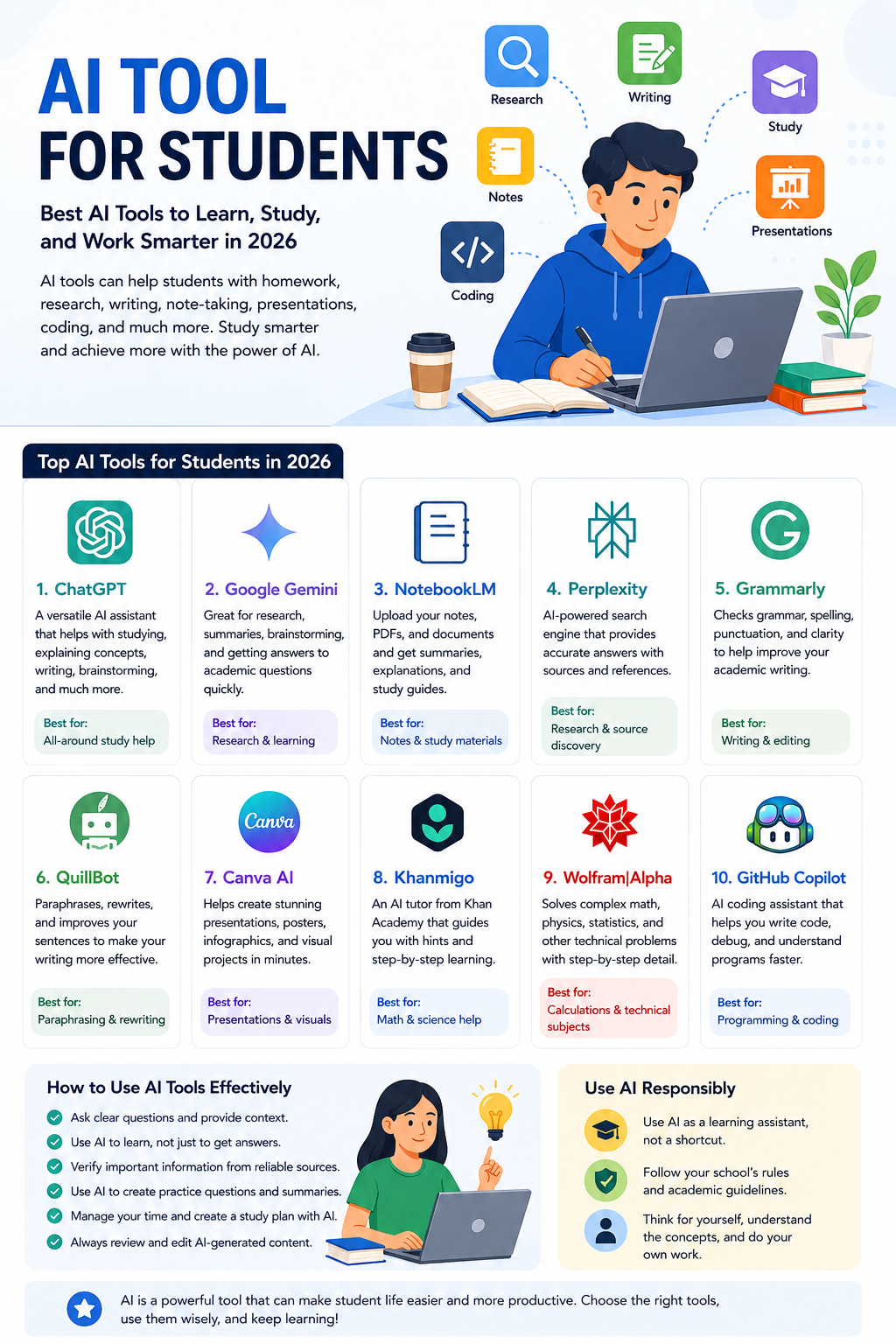
Being a student today is very different from being a student a few years ago. There are more digital resources, online classes, educational apps, and productivity tools than ever before. Among them, artificial intelligence has become one of the most useful technologies for learning.
A good AI tool for students can help explain difficult subjects, organize notes, improve writing, create practice questions, research topics, prepare presentations, and make study sessions more productive.
But there is an important point to remember: AI should support your learning, not replace it. The goal is not to ask an AI tool to complete everything for you. Instead, you can use AI as a personal tutor, research assistant, writing editor, and study partner.
In this guide, we will look at some of the best AI tools students can use in 2026 and explain how each one can make studying easier and more effective.
What Is an AI Tool for Students?
An AI tool for students is an application or online service that uses artificial intelligence to help with learning, studying, research, writing, organization, or academic tasks.
These tools can do many different things.
For example, an AI chatbot can explain a difficult mathematics concept in simple language. A writing assistant can find grammar mistakes in an essay. A research tool can help you discover information about a topic, while an AI presentation tool can help turn your ideas into slides.
The biggest advantage is that AI can respond to your specific needs.
If you do not understand an explanation, you can ask for a simpler version. If you want more examples, you can ask for examples. If you want to practice, you can ask the AI to create questions and test you.
This makes AI especially useful for students who want more personalized learning.
Why Students Are Using AI Tools in 2026
AI is becoming popular among students because it can save time and make difficult tasks easier to manage.
Faster Explanations
Students do not always understand a topic from the first explanation given by a teacher or textbook. AI can explain the same concept in different ways until it becomes easier to understand.
Personalized Learning
You can tell an AI tool your grade level, subject, and current understanding. It can then provide an explanation that is more suitable for you.
Better Time Management
AI can help break large assignments into smaller tasks and create realistic study schedules.
Help With Writing
Students can use AI writing tools to check grammar, improve sentence structure, brainstorm ideas, and make their writing clearer.
Exam Preparation
AI can create quizzes, flashcards, practice questions, and revision plans to help students prepare for exams.
The important thing is to use these benefits to improve your skills rather than avoiding the learning process.
Best AI Tool for Students in 2026
There is no single AI tool that is perfect for every student. Different tools are useful for different tasks.
Here are some of the best options worth considering.
1. ChatGPT – Best All-Around AI Tool for Students
ChatGPT is one of the most flexible AI tools students can use.
It can help explain school subjects, brainstorm ideas, review writing, create practice questions, help with coding, summarize information, and support research.
For example, if you are studying biology and do not understand a particular topic, you can ask ChatGPT to explain it using simple language.
You can then ask it to give you examples and create a short quiz.
This makes it more useful than simply asking for an answer.
Best for: Homework help, explanations, brainstorming, writing, coding, research, and exam preparation.
Free or paid: A free option is available, with paid plans offering additional features and higher usage limits.
Student tip: Ask ChatGPT to teach you a topic step by step and quiz you afterward.
2. Google Gemini – Great for Research and Learning
Google Gemini is another powerful AI assistant for students.
It can help with brainstorming, research, explanations, writing, study planning, and many other everyday tasks.
Students who already use Google services may find Gemini especially convenient.
For example, you can ask Gemini to explain a difficult historical event, create questions from a topic, or help organize ideas for a school project.
Best for: Research, brainstorming, explanations, and general study assistance.
Free or paid: Free access is available, while additional capabilities are offered through paid plans.
Student tip: Tell Gemini exactly what you are studying and your education level to receive a more useful response.
3. NotebookLM –Best AI Tool for Notes
Students often have to deal with large amounts of information. Lecture notes, PDFs, study guides, research papers, and textbooks can become difficult to manage.
NotebookLM is designed to help users work with their own source material.
You can provide study documents and use AI to understand and organize the information. It can be useful for creating summaries, study guides, questions, and other learning resources from your materials.
Best for: Notes, PDFs, course materials, research documents, and exam preparation.
Free or paid: Free access is available, with additional limits and features depending on the plan.
Student tip: Create separate notebooks for each subject so your study material remains organized.
4. Perplexity – Best for Student Research
Research is an important part of school and university life, but finding useful information can take a lot of time.
Perplexity is designed around AI-powered search and research. It can help students explore a topic and find relevant sources.
This can be particularly useful when starting a research project.
However, students should always open and check the original sources before using information in an assignment. AI-generated answers can sometimes contain mistakes.
Best for: Research, source discovery, fact-checking, and exploring unfamiliar subjects.
Free or paid: A free plan is available, with paid plans offering additional features.
Student tip: Use Perplexity to find sources, then read the original source yourself.
5. Grammarly – Best AI Writing Tool for Students
Writing assignments can be challenging, especially when English is not your first language.
Grammarly can help identify grammar, spelling, punctuation, and clarity issues.
It is useful for essays, reports, emails, applications, and other academic writing.
The best approach is to write your own first draft and then use Grammarly to review it.
Best for: Essays, reports, grammar, spelling, and editing.
Free or paid: Free features are available, with additional features offered through paid plans.
Student tip: Do not accept every suggestion automatically. Read each change and make sure it still sounds like you.
6. QuillBot AI Tool for Students – Best for Paraphrasing
QuillBot is another popular AI writing tool.
Students can use it to rewrite sentences, improve readability, check grammar, and explore alternative ways to express an idea.
However, students should be careful with paraphrasing. Changing the wording of someone else’s work does not remove the need to provide a citation.
Best for: Paraphrasing, rewriting, grammar, and editing.
Free or paid: A free version is available with limitations.
Student tip: Use QuillBot to improve your own writing instead of trying to hide copied content.
7. Canva AI – Best for Student Presentations
Students do not only write essays. They also create presentations, posters, infographics, charts, and other visual projects.
Canva can make these tasks easier by providing templates and AI-powered design features.
You can use it to create a presentation structure, design educational graphics, or make a visual project look more professional.
Best for: Presentations, posters, infographics, and visual assignments.
Free or paid: Free and paid options are available.
Student tip: Use AI to create a starting design, then customize the colors, text, images, and layout yourself.
8. Khanmigo – AI Tool for Students for Guided Learning
Some students prefer learning through questions and explanations rather than simply reading information.
Khanmigo is designed around educational assistance and can help students work through subjects such as mathematics and science.
A guided approach can be useful because it encourages students to think about the problem instead of immediately receiving an answer.
Best for: Math, science, tutoring, and guided practice.
Free or paid: Availability and pricing can depend on the program and location.
Student tip: Ask for a hint when you are stuck instead of requesting the final answer immediately.
9. Wolfram|Alpha – Best for Mathematics
Mathematics students often need more than a simple explanation. They need calculations, formulas, graphs, and step-by-step reasoning.
Wolfram|Alpha is a computational knowledge tool that can be useful for mathematics, statistics, physics, engineering, and other technical subjects.
It can help you check calculations and explore mathematical concepts.
Best for: Mathematics, statistics, physics, calculations, and technical subjects.
Free or paid: Basic features are available, with additional features offered through paid options.
Student tip: Solve a problem yourself first and then use Wolfram|Alpha to check your work.
10. GitHub Copilot – Best AI Tool for Programming Students
Programming students can also benefit from AI.
GitHub Copilot can assist with writing and understanding code, debugging, and exploring possible solutions.
It can be particularly useful when learning programming languages or working on software projects.
However, copying AI-generated code without understanding it can create problems later when you need to solve a similar problem yourself.
Best for: Coding, debugging, programming practice, and software projects.
Free or paid: Student and individual options may be available depending on eligibility.
Student tip: Ask the AI to explain the code line by line if you do not understand how it works.
How to Choose the Right AI Tool for Students
You do not need to subscribe to every AI service available.
Start by identifying what you actually need help with.
If you want an all-purpose study assistant, ChatGPT or Gemini is a good starting point.
If your main focus is research, Perplexity may be more useful.
If you work with lots of PDFs and class notes, NotebookLM can be a strong choice.
For writing, try Grammarly or QuillBot.
For presentations and visual assignments, Canva is worth exploring.
If mathematics is your biggest challenge, consider Khanmigo or Wolfram|Alpha.
Programming students can explore GitHub Copilot.
The right AI tool is not the one with the longest feature list. It is the one that solves your specific problem.
How to Use an AI Tool for Students Effectively
Simply having an AI tool does not automatically make you a better student. The way you use it matters.
One of the easiest ways to get better results is to provide context.
Instead of asking:
“Explain chemistry.”
Ask:
“I am a high school student studying chemistry. Explain chemical bonding in simple language, give me three examples, and then create five questions to test my understanding.”
The second prompt tells the AI exactly what you need.
You can also ask AI to change its teaching style.
For example:
- “Explain it like I am a beginner.”
- “Give me a real-world example.”
- “Explain this step by step.”
- “Quiz me after the explanation.”
- “Give me a harder practice question.”
- “Tell me what I misunderstood.”
These prompts turn AI from an answer generator into a learning assistant.
Use AI to Create a Study Plan
Managing multiple subjects can be difficult.
AI can help create a study schedule based on your available time.
For example, you could tell an AI tool:
“I have three weeks before my final exams. I have four subjects and can study three hours each day. Create a realistic weekly schedule with revision, practice questions, and rest periods.”
You should then review the plan and adjust it according to your real schedule.
Remember that a good study plan should include breaks. Studying for many hours without rest is not always productive.
Use AI to Prepare for Exams
One of the best uses of AI is exam preparation.
After studying a chapter, ask an AI tool to create practice questions.
For example:
“Create 20 multiple-choice questions about this chapter. Do not show the answers until I finish.”
Complete the questions yourself.
Then ask the AI to explain your mistakes.
You can also ask it to create flashcards, short-answer questions, definitions, and mock exams.
This approach is more effective than simply reading the same notes repeatedly.
Use AI to Understand Difficult Topics
Imagine you are studying a difficult topic and the textbook explanation does not make sense.
Instead of giving up, use AI to approach the topic from another angle.
Ask:
“Explain this concept using a simple real-world example.”
If that still does not work, ask:
“Explain it as if I am a beginner.”
You can continue asking questions until the concept becomes clearer.
This is one of the biggest advantages of using an AI tool for students because you can keep asking questions without feeling embarrassed about asking the same thing again.
Free vs Paid AI Tools for Students
Many students assume that they need expensive subscriptions to benefit from AI.
That is not always true.
Several popular AI tools provide free access that is enough for basic studying, writing, research, and homework help.
Paid plans can become useful if you need higher usage limits, advanced models, larger file uploads, or specialized features.
| Feature | Free AI Tools | Paid AI Tools |
|---|---|---|
| Basic questions | Yes | Yes |
| Study assistance | Yes | Yes |
| Writing help | Usually | Yes |
| Research | Available | More advanced |
| File analysis | Often limited | Higher limits |
| Advanced features | Limited | More available |
| Best for | Occasional users | Frequent users |
Before purchasing a subscription, check whether your school or university already provides access to an AI service.
Can Students Use AI Without Cheating?
Yes, but responsible use is important.
AI becomes a problem when students use it to complete work that they are expected to do themselves and then submit the result as their own.
A better approach is to use AI as a tutor or assistant.
For example, you can ask AI to explain a difficult concept, create practice questions, check grammar, brainstorm ideas, or give feedback on your draft.
You should also check your school’s AI policy because rules can differ between teachers, schools, colleges, and universities.
5 Smart Rules for Using AI in School
1. Use AI to Learn
Ask questions and request explanations instead of simply requesting final answers.
2. Check Important Information
AI can make mistakes. Verify important facts, statistics, quotations, and sources.
3. Write in Your Own Voice
If you use AI for brainstorming, make sure the final work reflects your own understanding and writing style.
4. Protect Your Privacy
Do not upload sensitive personal information, private school records, passwords, or confidential documents into an AI tool.
5. Follow Your Teacher’s Rules
If your instructor says AI is not allowed for a particular assignment, follow that instruction.
Frequently Asked Questions
What is the best AI tool for students?
There is no single best tool for everyone. ChatGPT and Gemini are strong general-purpose choices, while Perplexity is useful for research, Grammarly for writing, NotebookLM for notes, and Wolfram|Alpha for technical subjects.
Is there a free AI tool for students?
Yes. Many popular AI tools offer free plans. However, free versions often have usage limits or fewer advanced features than paid plans.
Can AI help students study for exams?
Yes. AI can create practice questions, quizzes, flashcards, summaries, explanations, and study schedules. Students should still review their original course material and verify important information.
Can AI write my homework?
AI can help you understand a homework question and guide you through the process, but submitting AI-generated work as your own may violate your school’s academic rules. It is better to use AI as a tutor and complete the work yourself.
Which AI tool is best for research?
Perplexity can be useful for discovering information and sources, while ChatGPT and Gemini can help explain and organize information. Always check original sources before using research in academic work.
Conclusion
The right AI tool for students can make studying easier, faster, and more personalized.
Whether you need help with homework, research, writing, mathematics, coding, presentations, notes, or exam preparation, there is likely an AI tool that can help.
ChatGPT and Gemini are excellent general-purpose options. NotebookLM is useful for working with study materials, while Perplexity can support research. Grammarly and QuillBot can improve writing, Canva can help with presentations, and tools such as Khanmigo, Wolfram|Alpha, and GitHub Copilot can support specialized subjects.
But remember that AI is a tool, not a replacement for learning.
Use it to ask better questions, understand difficult concepts, practice your skills, organize your workload, and prepare for exams. Check the information it provides and always follow your school’s rules.
When used correctly, an AI tool for students can become a helpful study partner that allows you to learn smarter, stay organized, and make better use of your time in 2026.
For more useful AI guides, technology tips, student resources, and digital tools, keep visiting CloudMagz.
[…] can also sound repetitive or generic if prompts are too simple. More importantly, AI can produce incorrect information, so fact-checking is […]