Studying is not always easy. Between long textbooks, difficult assignments, complicated topics, exams, and deadlines, students often have more work than time. The good news is that technology has made studying easier than ever, and AI tools for study are becoming a useful part of modern education.
AI can help students understand difficult subjects, summarize notes, create practice questions, improve writing, organize tasks, and research topics more efficiently. Instead of spending hours searching for a simple explanation, students can use AI to get personalized help within seconds.
However, AI should not be used as a shortcut for avoiding learning. The smartest students use AI as a study partner. They ask questions, check explanations, practice problems, and then use their own knowledge to complete their work.
In this guide, we will explore some of the best AI tools for study in 2026, how they can help you, and how to use them responsibly.
What Are AI Tools for Study?
AI tools for study are software applications that use artificial intelligence to help students learn, organize information, complete research, practice skills, and improve productivity.
These tools can perform many different tasks. For example, an AI chatbot can explain a difficult science concept in simple language. Another tool can turn a long document into a short summary. AI writing assistants can help find grammar mistakes, while specialized education tools can help students practice mathematics.
The biggest advantage is personalization.
If a textbook explanation is too complicated, you can ask an AI tool to explain the same concept as if you were a beginner. You can also ask for examples, practice questions, quizzes, or a step-by-step explanation.
That makes AI particularly useful for students with different learning styles.
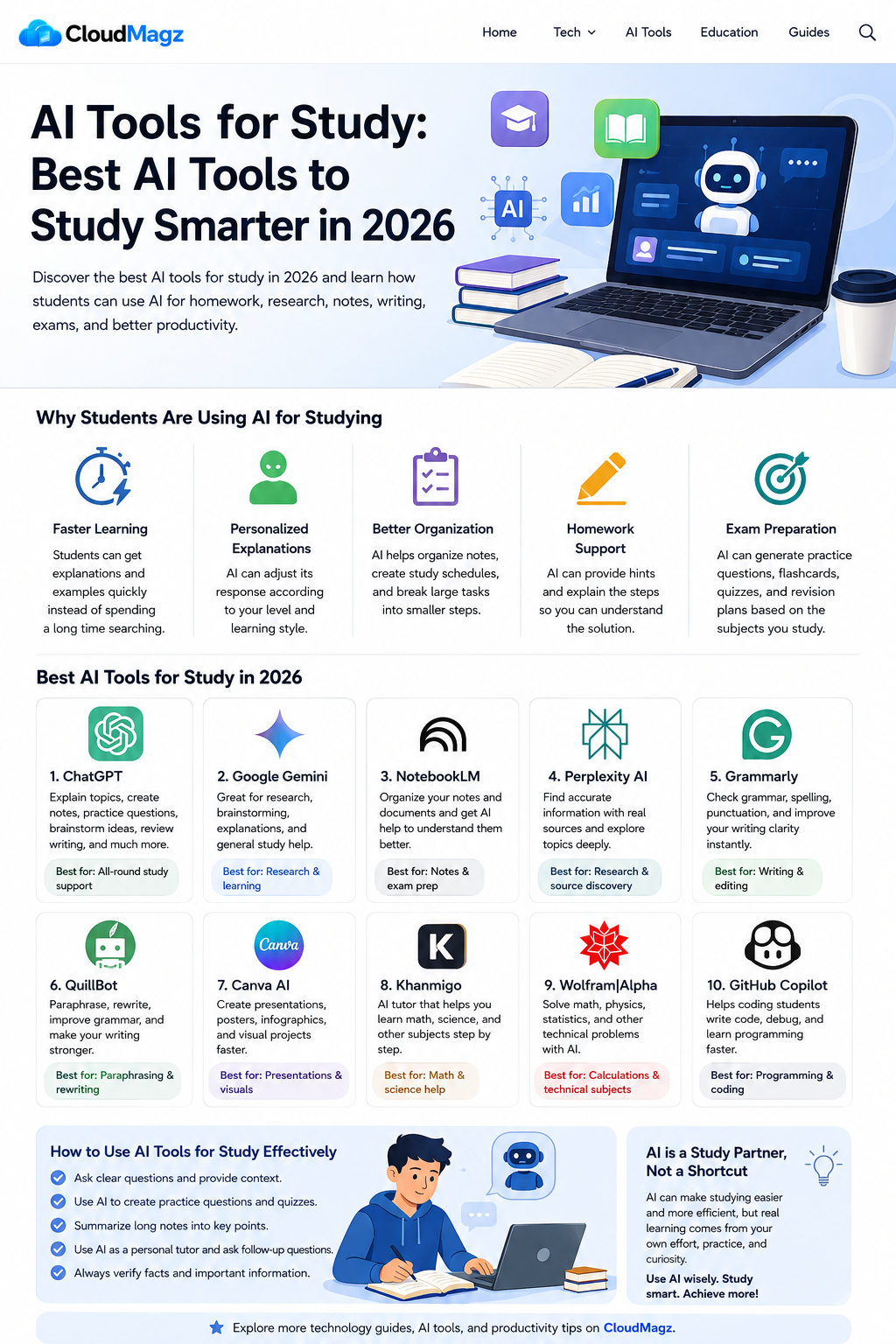
Why Students Are Using AI for Studying
There are several reasons AI has become popular among students.
1. Faster Learning
Students can get explanations and examples quickly instead of spending a long time searching through different websites.
2. Personalized Explanations
AI can adjust its response according to your level. You can ask for a beginner-friendly explanation or request a more advanced answer.
3. Better Organization
AI can help organize notes, create study schedules, summarize information, and break large projects into smaller tasks.
4. Homework Support
When you are stuck on a problem, AI can provide hints and explain the steps so you can understand the solution.
5. Exam Preparation
AI can generate practice questions, flashcards, quizzes, and revision plans based on the subjects you are studying.
The goal should not be to make studying completely effortless. Instead, AI should help you spend more time understanding and practicing and less time dealing with repetitive tasks.
Best AI Tools for Study in 2026
There are many AI applications available today, but you do not need to use all of them. Choosing a few tools that match your study habits is usually much more effective.
1. ChatGPT
ChatGPT is one of the most flexible AI tools for study. Students can use it for almost every stage of the learning process.
You can ask it to explain difficult topics, create study notes, generate practice questions, brainstorm ideas, review writing, help with coding, or quiz you before an exam.
For example, instead of asking:
“Give me the answer to this question.”
Try:
“Explain how to solve this problem step by step and give me a similar question to practice.”
That approach helps you learn instead of simply copying an answer.
Best for: Homework help, explanations, brainstorming, writing, coding, and exam preparation.
Pro tip: Ask ChatGPT to act as your personal tutor and quiz you after explaining a topic.
2. Google Gemini
Google Gemini is another useful AI assistant for students. It can help with research brainstorming, explanations, writing, and general study questions.
If you already use Google products for school, Gemini can fit naturally into your existing workflow.
You can ask it to explain a complicated topic, create a revision plan, summarize information, or help you understand a subject from a different perspective.
Best for: Research, study questions, brainstorming, and general learning.
Pro tip: Tell Gemini your education level before asking a question so the explanation can be better matched to your needs.
3. NotebookLM
NotebookLM is particularly useful when you already have study materials.
You can work with documents, notes, research materials, and other sources and use AI to understand the information more efficiently.
This can be helpful when preparing for an exam because you can organize your course materials and ask questions about them.
For example, you could upload your lecture notes and ask:
“Create 20 important questions from these notes.”
You could then use those questions for revision.
Best for: Lecture notes, PDFs, research materials, and exam preparation.
Pro tip: Create separate notebooks for different subjects to keep your study material organized.
4. Perplexity AI
Research can take a lot of time, especially when you need to find reliable information from multiple sources.
Perplexity AI can help students explore topics and discover sources while providing answers with references.
This makes it useful during the early stages of research.
However, you should always open the original sources and verify important information before using it in academic work.
Best for: Research, fact-checking, source discovery, and exploring unfamiliar topics.
Pro tip: Use Perplexity to discover sources, then read the original sources yourself.
5. Grammarly
Good writing is important for essays, reports, applications, and school projects.
Grammarly can help students identify grammar, spelling, punctuation, and clarity problems in their writing.
It is especially useful during the editing stage.
Instead of asking an AI tool to write your entire essay, write your ideas yourself and use Grammarly to identify mistakes and improve readability.
Best for: Essays, reports, emails, grammar, and editing.
Pro tip: Always read Grammarly’s suggestions yourself before accepting them. Your original writing style matters.
6. QuillBot
QuillBot is another useful writing tool for students.
It can help with paraphrasing, rewriting, grammar, and improving sentence structure. It can be useful when you have written something but feel that a sentence could be clearer.
However, students should never use paraphrasing software to hide plagiarism. If an idea comes from another source, you still need to cite that source properly.
Best for: Paraphrasing, rewriting, grammar, and editing.
Pro tip: Use QuillBot to improve your own writing rather than changing copied content.
7. Canva AI
Studying does not always involve essays. Many students also need to create presentations, posters, diagrams, and visual projects.
Canva’s AI features can help students create designs and presentation materials faster.
You can use Canva to organize information visually, create presentation slides, and design educational graphics.
Best for: Presentations, posters, infographics, and visual projects.
Pro tip: Use AI to create the first design, then customize it yourself so the presentation matches your subject and personality.
8. Khanmigo
Students who need help with mathematics and science can benefit from educational AI tutors such as Khanmigo.
Instead of simply giving an answer, an AI tutor can guide you through a problem and encourage you to think about the solution.
This is particularly useful when you are preparing for an exam and need additional practice.
Best for: Math, science, tutoring, and guided learning.
Pro tip: Ask for a hint before asking for the complete solution.
9. Wolfram|Alpha
Wolfram|Alpha is a valuable tool for students studying mathematics, physics, engineering, statistics, and other technical subjects.
It can perform calculations and help students explore mathematical problems.
The best way to use it is as a checking and learning tool rather than simply copying results.
Best for: Mathematics, calculations, statistics, and technical subjects.
Pro tip: Solve the problem yourself first, then use Wolfram|Alpha to check your result.
10. GitHub Copilot
Programming students have their own unique study challenges.
GitHub Copilot can help students write code, understand programming concepts, identify potential problems, and explore different ways to solve programming tasks.
However, copying AI-generated code without understanding it can hurt your learning.
Best for: Programming, coding practice, debugging, and software projects.
Pro tip: Ask the AI to explain every important section of the code you do not understand.
How to Use AI Tools for Study Effectively
Having access to AI is not enough. You need to know how to ask useful questions.
One of the best techniques is to provide context.
Instead of saying:
“Explain photosynthesis.”
Try:
“I am a high school student studying biology. Explain photosynthesis in simple language, give me a real-world example, and then ask me five quiz questions.”
The second prompt gives the AI more information and usually produces a more useful study session.
You can also ask AI to create a study plan.
For example:
“I have seven days before my biology exam. I can study two hours each day. Create a realistic revision schedule covering these five chapters.”
AI can then help break a large goal into smaller tasks.
Use AI to Create Practice Questions
One of the best ways to learn is through active recall.
After studying a chapter, ask an AI tool to create questions based on the material.
For example:
“Create 15 multiple-choice questions from this chapter. Do not show the answers until I finish.”
Answer the questions yourself first.
Then ask the AI to explain the questions you got wrong.
This creates a much more active learning process than simply reading notes again and again.
Use AI Tools for Study to Summarize Long Notes
Long study materials can be overwhelming.
You can use AI to turn a large set of notes into:
- Key points
- Definitions
- Important dates
- Formulas
- Practice questions
- Flashcards
- Short revision notes
But do not rely on summaries blindly. Compare them with your original notes, especially before an important exam.
Use AI as a Personal Tutor
One of the most useful ways to use AI tools for study is to treat them like a private tutor.
You can say:
“I don’t understand this topic. Start from the basics and teach me step by step. After each section, ask me a question to make sure I understand.”
This approach encourages active learning.
If you get something wrong, ask:
“Explain why my answer is incorrect without immediately giving me the final answer.”
That can help you identify where your understanding went wrong.
Are AI Tools for Study Free?
Many popular AI tools offer free versions, but their features and usage limits vary.
Free tools are often enough for students who only need occasional help. If you use AI every day or need advanced features, you may consider a paid subscription.
Before paying, check whether your school or university provides free access to any AI services.
It is also important to compare the actual features rather than choosing a tool simply because it is popular.
For example, one tool might be better for research while another might be much better for organizing notes.
Free vs Paid AI Study Tools
| Feature | Free Tools | Paid Tools |
|---|---|---|
| Basic AI questions | Usually available | Yes |
| Homework help | Yes | Yes |
| Writing assistance | Usually available | More advanced |
| Research features | Available on some tools | Usually more powerful |
| File uploads | Often limited | Higher limits |
| Advanced models | Limited | More options |
| Best for | Occasional use | Frequent users |
Can AI Replace Traditional Studying?
No.
AI can make studying faster and more convenient, but it cannot replace genuine learning.
You still need to read, think, practice, remember information, solve problems, and develop your own understanding.
If you use AI to answer every question without thinking, you may finish your homework faster but learn less.
The best approach is to combine traditional study methods with AI.
For example:
Read → Ask AI → Practice → Test Yourself → Review Mistakes
This creates a much stronger learning cycle.
How to Use AI Without Cheating
Responsible AI use is extremely important for students.
1. Check Your School’s Rules
Different schools and universities have different policies. Some allow AI for brainstorming and editing, while others may restrict AI-generated content.
Always follow your instructor’s rules.
2. Do Your Own Thinking
AI should support your ideas, not replace them.
If you are writing an essay, create your argument and structure yourself before using AI for feedback.
3. Verify Facts
AI systems can make mistakes. Always verify important information, statistics, quotations, and academic references.
4. Don’t Submit AI Work as Your Own
If your teacher does not allow AI-generated assignments, do not submit them as your own work.
Learning is more important than getting a quick answer.
Final Thoughts
The best AI tools for study can make student life easier, but the real value comes from how you use them.
Tools such as ChatGPT, Gemini, NotebookLM, Perplexity, Grammarly, QuillBot, Canva, Khanmigo, Wolfram|Alpha, and GitHub Copilot can help with different parts of the learning process.
You can use AI to understand difficult concepts, organize notes, prepare for exams, improve writing, research topics, and practice new skills.
But remember one simple rule: use AI to become a better student, not to avoid being a student.
Ask questions. Challenge the answers. Practice on your own. Check important information. Most importantly, develop your own understanding.
When used responsibly, AI can become one of the most useful study partners available to students in 2026.
For more practical technology guides, AI tools, productivity tips, and useful digital resources, keep following CloudMagz.
[…] can help you understand a homework question and guide you through the process, but submitting AI-generated work as your own may violate your school’s academic rules. It is better to use AI as a tutor and […]