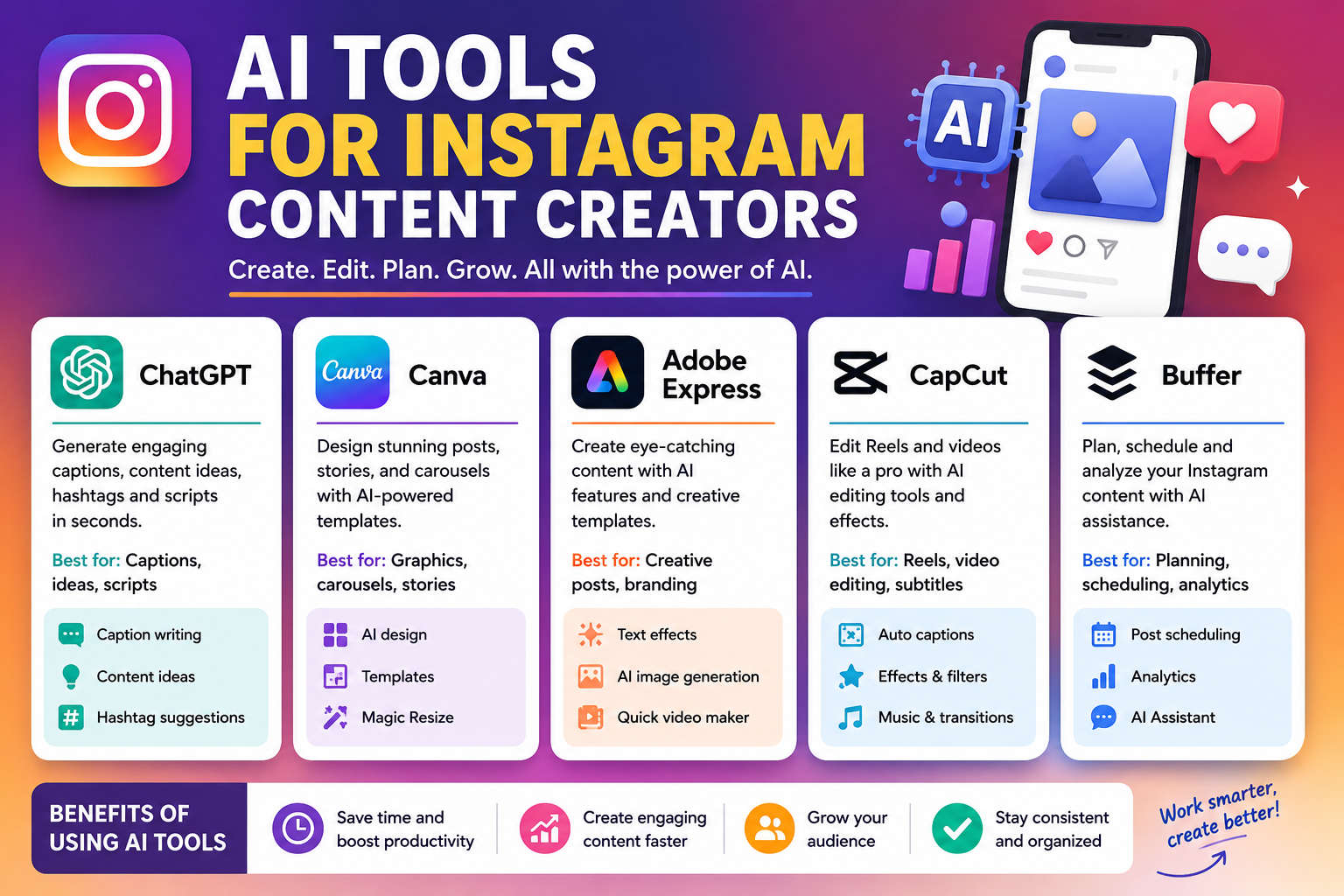
AI Tools for Instagram Content Creators, Instagram has become an important platform for creators, influencers, bloggers, freelancers, and businesses that want to connect with their audiences. However, creating attractive posts, writing engaging captions, editing Reels, and maintaining a consistent publishing schedule can take a lot of time. This is where AI tools for Instagram content creators can make a real difference. These tools help simplify content creation, generate fresh ideas, improve visuals, and organize social media activities without requiring advanced technical skills.
Whether you are starting a new Instagram account or managing an established page, the right AI tools can help you work more efficiently. You do not necessarily need an expensive subscription to begin. Several popular platforms offer free features that can help you develop a practical Instagram content strategy.
What Are AI Tools for Instagram Content Creators?
AI tools for Instagram content creators are applications that use artificial intelligence to assist with writing, designing, editing, planning, and improving social media content. Depending on the application, you can use AI to generate captions, brainstorm Reel ideas, create carousel designs, edit images, prepare video scripts, and repurpose existing content.
For example, a fitness creator could use an AI writing assistant to develop workout tips, a graphic design tool to create educational carousels, and a video editor to add captions to workout demonstrations. Instead of completing every task manually, the creator can use AI to speed up repetitive work while concentrating on creativity and audience engagement.
These tools are useful for different types of Instagram accounts, including fashion, travel, technology, food, education, beauty, fitness, and digital marketing. The best results usually come from combining AI assistance with original ideas, accurate information, and a recognizable personal style.
Best AI Tools for Instagram Content Creators
1. ChatGPT for Captions and Content Ideas
ChatGPT is a flexible AI writing assistant that can help Instagram creators brainstorm topics, write captions, develop content calendars, and prepare scripts for short videos. You can describe your niche, target audience, and preferred writing style to receive content suggestions that match your goals.
For example, if you run a technology page, you can ask ChatGPT to generate ten Instagram post ideas about artificial intelligence, write a caption explaining a useful application, or suggest a strong opening hook for a Reel. You can also ask it to rewrite a caption in a friendly, professional, educational, or humorous tone.
The free plan makes ChatGPT a useful starting point for creators who want writing assistance without immediately paying for another subscription. However, you should review the generated content, verify factual claims, and add your own experience to avoid generic posts.
Website: https://chatgpt.com/
2. Canva AI for Instagram Graphics
Canva is a popular design platform that helps creators produce Instagram posts, Stories, carousels, promotional graphics, and other visual content. Its AI-powered tools can assist with generating designs, improving images, and developing creative layouts from text instructions. Canva also provides a range of templates that beginners can customize without professional design experience.
Suppose you want to publish a carousel explaining five productivity tips. You can select an Instagram-friendly layout, organize the information across multiple slides, add suitable illustrations, and customize the colors and typography. Using a consistent design style can help your profile look more professional and recognizable.
Canva offers free access to selected AI features, although advanced tools and usage limits depend on the plan. It is especially useful for creators who want to produce attractive visual content without hiring a designer.
Website: https://www.canva.com/
3. Adobe Express for Creative Instagram Posts
Adobe Express is another useful option for creating social media graphics and promotional content. It provides customizable templates, image-editing tools, design elements, and selected generative AI features that can help creators develop visual content more efficiently.
Instagram creators can use Adobe Express to design announcements, quote graphics, product promotions, educational posts, and branded visuals. For instance, a travel blogger might create a destination guide with photographs, location details, and practical travel tips. A small business could use the same platform to prepare promotional graphics for a product launch.
Adobe Express is suitable for users who want a straightforward design workflow. Some features are available for free, while premium assets and advanced capabilities may require a paid plan.
Website: https://www.adobe.com/express/
4. Buffer AI Assistant for Content Planning
Publishing consistently can be challenging when you manage several social media accounts or have limited time. Buffer offers social media management features alongside an AI Assistant that can help creators generate post ideas, draft captions, and adapt existing content for different audiences.
For example, you could turn a blog article into several short Instagram captions or prepare multiple variations of a promotional message. You can then review the drafts and organize your content according to your publishing schedule.
Buffer is particularly useful for creators who want to combine content preparation with social media planning. Its free features and publishing limits may vary, so check the current plan details before choosing it as your primary scheduling tool.
Website: https://buffer.com/
5. CapCut for Instagram Reels
Short-form video is an important content format on Instagram, and CapCut offers video-editing tools that can help creators prepare polished Reels. Depending on the features available in your version, you can use automatic captions, templates, transitions, visual effects, and other editing options to improve your videos.
Imagine recording a tutorial about a useful website or demonstrating a new recipe. You can trim unnecessary sections, add readable subtitles, combine clips, and improve the pacing before publishing the Reel. Captions are particularly helpful for viewers who watch videos with their sound turned off.
CapCut offers free editing features, although some effects and AI capabilities may require payment or may vary by region. Remember that strong storytelling and useful information matter just as much as editing effects.
Website: https://www.capcut.om/
Benefits of Using AI Tools for Instagram Content Creation
Save Time and Improve Productivity
One of the biggest advantages of AI tools is that they reduce the time spent on repetitive tasks. Generating caption ideas, preparing content outlines, creating design drafts, and editing videos can all require considerable effort when completed from scratch.
AI can help you prepare the first draft more quickly, leaving additional time for filming, communicating with followers, researching your niche, and improving your content strategy. Creators who manage several accounts may find this particularly valuable because they can reuse ideas in different formats instead of repeatedly starting over.
Create More Engaging Content
AI tools can suggest attention-grabbing opening lines, educational topics, questions, and calls to action. A strong opening can help communicate the value of a post quickly, while a relevant question can encourage meaningful discussion.
However, AI cannot guarantee that a post will receive more likes, shares, or followers. Audience interests, content quality, presentation, and consistency all influence performance. Treat AI suggestions as ideas to test rather than guaranteed formulas for success.
Maintain a Consistent Brand Style
A recognizable style helps followers identify your content. AI writing tools can assist with maintaining a consistent tone, while design applications can help you reuse colors, fonts, and layouts across posts.
For example, a technology creator might use simple explanations and clean graphics, while a travel creator might prefer storytelling captions and photography-focused layouts. You can give AI tools examples of your previous content and ask them to follow similar stylistic guidelines.
How to Use AI to Create Instagram Content
Creating Instagram content with AI does not need to be complicated. Start by identifying your niche and the audience you want to reach. Next, choose a topic that answers a question, solves a problem, shares useful information, or introduces a product or service.
Use an AI writing assistant to prepare a caption or Reel script. Give it clear instructions about the audience, tone, format, and objective. For example:
“Create five Instagram Reel ideas for a beginner-friendly technology page. Each idea should include an attention-grabbing opening, three useful talking points, and a short caption written in simple English.”
After generating the ideas, choose the strongest one and personalize it. Use Canva or Adobe Express to create supporting visuals, or use CapCut to edit your recorded video. Before publishing, check the spelling, accuracy, image quality, and relevance of the content.
Finally, monitor your account’s available analytics. Look at metrics such as reach, shares, saves, profile visits, and audience interactions to understand which formats perform well. Use these observations to improve future content rather than relying entirely on AI-generated recommendations.
Tips for Getting Better Results From Instagram AI Tools
To get useful results, provide specific instructions instead of asking an AI application to create a generic post. Mention your niche, target audience, preferred tone, content format, and the action you want readers to take.
You should also avoid publishing every AI-generated caption without editing it. Add real examples, personal opinions, original photographs, and details that reflect your experience. This helps make your content more distinctive and trustworthy.
Another useful approach is to create content in batches. You can brainstorm several topics in one session, draft captions together, and prepare multiple graphics before scheduling your posts. This creates a more organized workflow and reduces the pressure of deciding what to publish every day.
Finally, respect copyright, privacy, and platform rules. Check the licensing terms for images and audio, avoid sharing confidential information with AI applications, and verify any claims about products or services before publishing.
Conclusion
AI tools for Instagram content creators can make social media management easier by helping with captions, graphics, Reels, content ideas, and publishing plans. ChatGPT is useful for writing and brainstorming, Canva and Adobe Express support visual design, Buffer helps organize content, and CapCut provides practical video-editing features.
You do not need to use every available application to build a successful workflow. Start with one or two tools that address your biggest challenges, explore their free features, and improve your process as your account grows. Most importantly, combine AI assistance with original ideas, accurate information, and a genuine understanding of your audience. This balance can help you create more consistent and useful Instagram content without making your workflow unnecessarily complicated.
Frequently Asked Questions
1. What are the best AI tools for Instagram content creators?
ChatGPT, Canva, Adobe Express, Buffer, and CapCut are useful options. They support different tasks, including caption writing, graphic design, content planning, and video editing.
2. Are there free AI tools for Instagram content creation?
Yes. Several platforms offer free plans or selected free features. However, usage limits, premium templates, and advanced AI functions may require a subscription.
3. Can AI write Instagram captions?
Yes. AI writing assistants can generate caption ideas, hooks, calls to action, and alternative versions of existing text. Reviewing and personalizing the results helps maintain your brand’s voice.
4. Can AI tools create Instagram Reels?
AI tools can help with Reel ideas, scripts, captions, editing, and visual effects. You may still need to record original footage or combine existing clips to produce the final video.
5. Will AI tools help grow my Instagram account?
AI tools can make content creation more efficient, but they cannot guarantee account growth. Useful content, consistent publishing, audience interaction, and performance analysis remain important parts of a sustainable Instagram strategy. // editer. cloudmagz