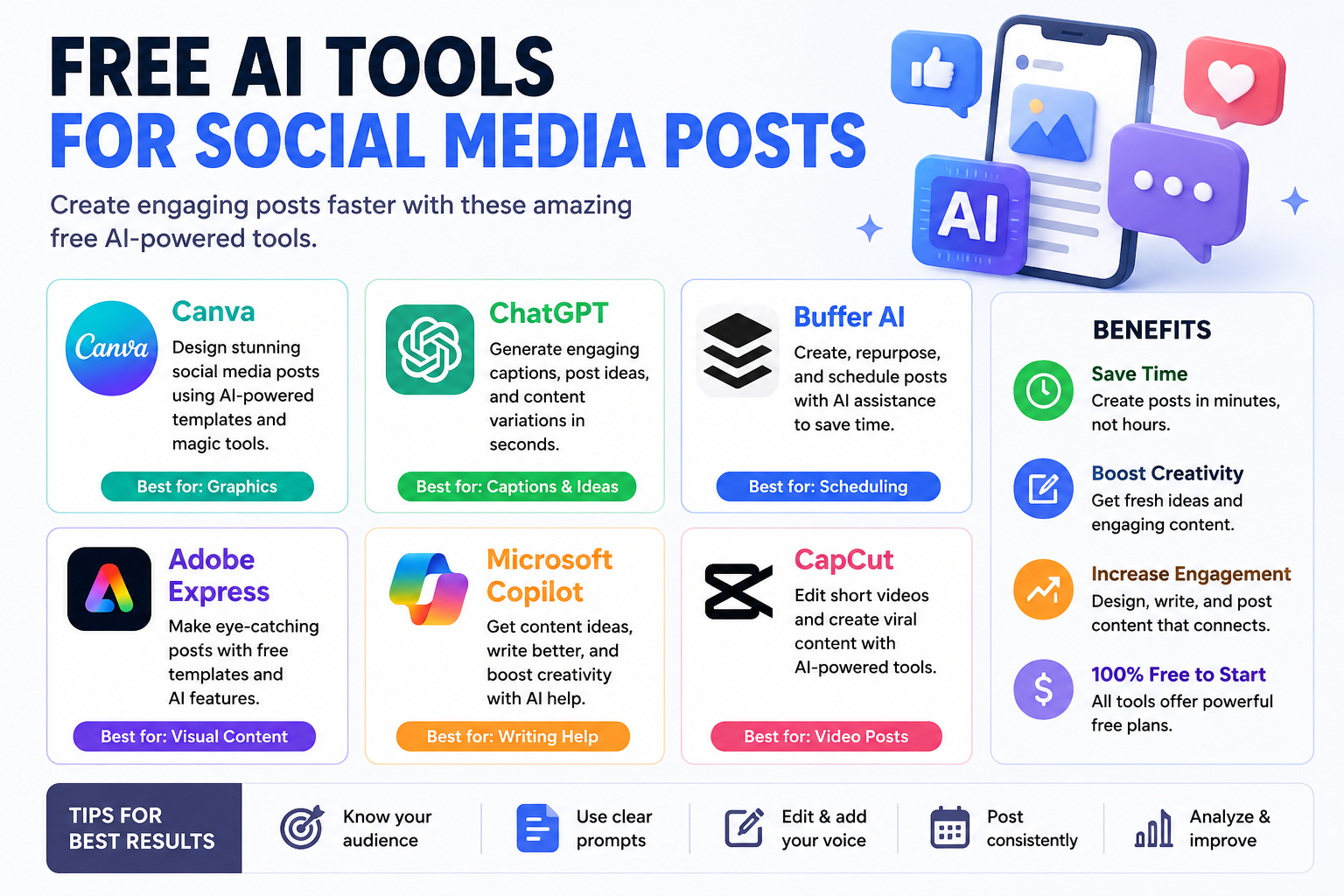
Free AI tools for social media posts are online applications that use artificial intelligence to help people create captions, promotional messages, post ideas, hashtags, images, and other types of social media content. These tools can be useful for business owners, bloggers, freelancers, digital marketers, influencers, and anyone who wants to maintain an active social media presence without spending hours creating content manually. Instead of starting with a blank page, you can describe your idea to an AI tool and receive suggestions that you can edit and publish. Some platforms focus on writing, while others combine AI writing with graphic design, video editing, and content scheduling.
Social media platforms such as Instagram, Facebook, LinkedIn, TikTok, Pinterest, and X each have different audiences and content styles. A professional LinkedIn update may require a different tone from a funny Instagram caption or a short TikTok video description. AI tools help adapt your message to these different formats. For example, if you run a clothing store, you can ask an AI assistant to create a product announcement, write a promotional caption, suggest relevant hashtags, and produce several alternative versions of the same message. The result is a faster content creation process, although you should always review the suggestions to ensure they accurately represent your business.
AI-powered content creation tools can support almost every stage of social media marketing. They can suggest topics based on your niche, turn product details into engaging captions, rewrite complicated information in simple language, and help you maintain a consistent brand voice. Some tools also generate visual designs or help transform existing blog posts into short social media updates.
For example, imagine you manage a technology blog and want to promote an article about artificial intelligence. You could use an AI writing assistant to create a Facebook introduction, a LinkedIn summary, an Instagram caption, and several short posts for X. You could then use a design platform to create a matching image and a scheduling tool to plan publication. Rather than using the same caption everywhere, you can adjust the wording to suit each audience. This approach helps you save time while keeping your content relevant, clear, and consistent.
Choosing the right tool depends on the type of content you create, your preferred social media platforms, and the features you need. Some applications provide free AI writing features, while others offer free graphic design tools or social media scheduling with certain limitations. Here are several useful options to explore.
1. Canva AI
Website: Canva AI Social Media Post Generator
Canva offers an AI-powered social media post generator alongside a graphic design editor. You can describe the type of post you want, generate text suggestions, and combine them with templates, photos, icons, and other design elements.
Canva AI is particularly helpful for people who want attractive social media posts without professional graphic design experience. Suppose you are promoting a new product, announcing a discount, or sharing an educational tip. You can start with a suitable template, customize the text, add your branding, and create a design for your chosen platform. The drag-and-drop editor makes it easier to change colors, fonts, images, and layouts until the post matches your style.
The free experience includes useful design capabilities, but some advanced AI features, premium assets, and brand-management options may require a paid plan. Before creating a large content campaign, check whether the specific features you need are available on your account. Canva is a strong starting point if visual consistency is important to your social media strategy.
2. Buffer AI Assistant
Website: Buffer AI Assistant
Buffer provides an AI social media post creator that can generate content ideas, draft captions, adjust tone, and adapt existing text for different social networks. Its browser-based generator offers up to five post generations per day, Free AI Tools for Social Media Posts while account-based features and limits can differ.
Buffer is useful for creators and small businesses that want to organize their social media workflow. You can enter a topic, explain your target audience, and describe what you want the post to achieve. The tool can then suggest content that you can edit before publishing. For example, a digital marketing agency could use it to create a short tip about keyword research, rewrite the message for LinkedIn, and produce a more conversational version for Facebook.
One advantage of Buffer is that it combines content planning with social media management. Depending on the plan and connected channels, you can organize drafts and schedule posts instead of creating everything immediately before publication. Its free plan has limits, so review the current terms before relying on it for a high-volume campaign.
3. Adobe Express
Best for: Professional-looking graphics and branded social posts.
Website: Adobe Express Social Media Post Maker
Adobe Express provides a social media post maker with templates, image editing, design elements, and selected generative AI capabilities. Its social post creator offers free access to basic creation features, although some advanced options require a subscription.
Adobe Express is worth considering when you want polished visuals for product promotions, announcements, educational posts, or brand campaigns. You can select a template, add your own photos, adjust the layout, and customize the design to suit your audience. The platform also supports different types of creative content, including images and videos, making it useful for businesses that publish across several social channels.
For example, a restaurant could create a weekly menu announcement, while a technology blogger could design a graphic explaining the benefits of an AI application. You do not need to be an experienced designer to get started. However, you should check the availability and usage limits of individual AI features because not every feature is necessarily included in the free plan.
4. ChatGPT
Best for: Captions, content ideas, hooks, and writing assistance.
ChatGPT can help brainstorm social media topics, draft captions, rewrite text, develop content calendars, and adapt messages to different audiences. Feature availability and usage limits depend on the account and plan.
ChatGPT is a flexible choice because you can explain exactly what kind of post you want instead of relying on a fixed template. For instance, you could request ten Instagram caption ideas for a skincare business, five educational LinkedIn posts about digital marketing, or a week’s worth of content ideas for a technology website. You can also specify whether you want the language to sound friendly, professional, persuasive, educational, or humorous.
The quality of the results depends partly on the instructions you provide. A vague request such as “write a social media post” may produce generic content. A more detailed prompt that identifies your audience, topic, goal, tone, and preferred length usually gives you a more useful starting point. Always check factual claims, remove repetitive wording, and add your own experience before publishing.
5. Other Free AI Tools Worth Exploring
Several other tools may fit particular social media tasks. Their free features, limits, and availability can change, so test the current offering before making one part of your workflow dependent on a particular application.
-
Microsoft Copilot — Visit Copilot to brainstorm post ideas, draft captions, and rewrite marketing messages.
-
Google Gemini — Visit Gemini to generate content ideas, summarize information, and create alternative versions of a post.
-
CapCut — Visit CapCut for video editing and social media content, with AI features depending on availability and plan.
-
Grammarly — Visit Grammarly to improve clarity, grammar, and tone in captions and promotional copy.
These applications serve different purposes, so you do not need to use all of them. A writing assistant may be enough for a text-focused LinkedIn account, while an Instagram creator may benefit more from combining a writing tool with a graphic editor. Video creators may prioritize editing and subtitles instead. The most practical choice is the tool that solves your biggest content creation problem without adding unnecessary complexity.
The following table summarizes the main use cases for these tools. It is intended as a practical starting point rather than a guarantee that every listed feature is unlimited or free.
| Tool | Main purpose | Useful for | Free access |
|---|---|---|---|
| Canva AI | AI writing and design | Instagram, Facebook, Pinterest | Yes, with feature limits |
| Buffer AI Assistant | Captions and content planning | Multiple social platforms | Yes, with usage limits |
| Adobe Express | Graphic design and creative content | Promotional posts and campaigns | Yes, with feature limits |
| ChatGPT | Writing and brainstorming | Captions, ideas, and calendars | Free plan available |
| Microsoft Copilot | Writing assistance | Drafts and content ideas | Free access available |
| Google Gemini | Writing and idea generation | Captions and content planning | Free access available |
| CapCut | Video creation and editing | Reels and short-form videos | Free tools, with some restrictions |
| Grammarly | Writing improvement | Clearer captions and copy | Free features available |
The best choice depends on whether you need writing, design, video editing, or scheduling. For a simple workflow, you might draft captions in ChatGPT, design images in Canva, and organize your publishing schedule in Buffer. This combination can cover many everyday needs without requiring an expensive collection of subscriptions.
Save Time on Content Creation
Creating social media content consistently can be difficult when you are also managing customers, writing articles, handling orders, or running a business. AI tools reduce the time needed to brainstorm topics and prepare first drafts. Instead of spending an hour trying to write one caption, you can generate several ideas quickly and choose the most relevant one.
Time savings become especially valuable when you manage multiple social media accounts. A single product update might need a short Instagram caption, a professional LinkedIn post, and a promotional Facebook message. AI can help adapt the same basic information to each platform, leaving you more time to check the quality and interact with your audience. You should still review every draft rather than automatically publishing everything the tool generates.
Generate Fresh Ideas When You Feel Stuck
Many creators experience writer’s block because they repeatedly cover the same topics. AI tools can suggest new angles, questions, educational posts, short tutorials, and promotional ideas related to your niche. A technology website, for example, could develop posts about AI productivity, online privacy, blogging, content marketing, and beginner-friendly software tutorials.
These suggestions can serve as a starting point for your own creativity. You can ask the tool to produce ideas for beginners, compare different approaches, or turn a broad topic into a series of short posts. Rather than treating AI as the source of every idea, use it as a brainstorming partner that helps you discover possibilities you might not have considered.
Improve Writing and Readability
Not every business owner feels confident writing promotional content. Some people struggle with grammar, while others find it difficult to explain technical subjects in simple language. AI writing assistants can help simplify sentences, improve structure, suggest alternative wording, and adjust the tone of a message.
For example, a complicated product description can be transformed into a short caption that explains the main benefit in everyday language. A professional update can be made more conversational, while a casual draft can be refined for a business audience. The important thing is to retain your actual message and avoid publishing exaggerated claims just because they sound persuasive.
Create Consistent Content Across Platforms
A recognizable brand voice helps audiences understand what your business represents. AI tools can assist with consistency by following instructions about tone, vocabulary, audience, and content style. You might ask an assistant to write in a friendly, informative voice and avoid unnecessary technical terms.
Consistency does not mean copying the same caption onto every platform. Instead, it means maintaining the same overall message while adjusting the presentation for different audiences. A detailed LinkedIn explanation may become a shorter Instagram caption, while a video post may need a compelling opening line and concise description.
Conclusion
Free AI tools for social media posts make it easier to brainstorm ideas, write captions, create visuals, and plan content without requiring a large marketing budget. Tools such as Canva AI, Buffer AI Assistant, Adobe Express, and ChatGPT each offer different advantages, from graphic design to writing assistance and content organization. The best option depends on your goals, audience, preferred platforms, and the limits of each free plan.
To get the most value from these tools, start with a clear content strategy, write specific prompts, personalize every draft, and review your results after publishing. AI should support your creativity rather than replace your judgment. By combining automation with original ideas and a genuine understanding of your audience, you can create useful, engaging social media content while making better use of your time and resources.
Frequently Asked Questions (FAQs)
Canva AI, Buffer AI Assistant, Adobe Express, and ChatGPT are useful starting points. Canva and Adobe Express are particularly helpful for visual designs, Buffer supports caption creation and content planning, and ChatGPT can assist with brainstorming and writing. The best option depends on your specific requirements and the free features currently available.
[…] Express is another useful option for creating social media graphics and promotional content. It provides customizable templates, image-editing tools, design […]
[…] focuses on AI-assisted social media content creation tools. Its features may help users generate post ideas, captions, and visual […]