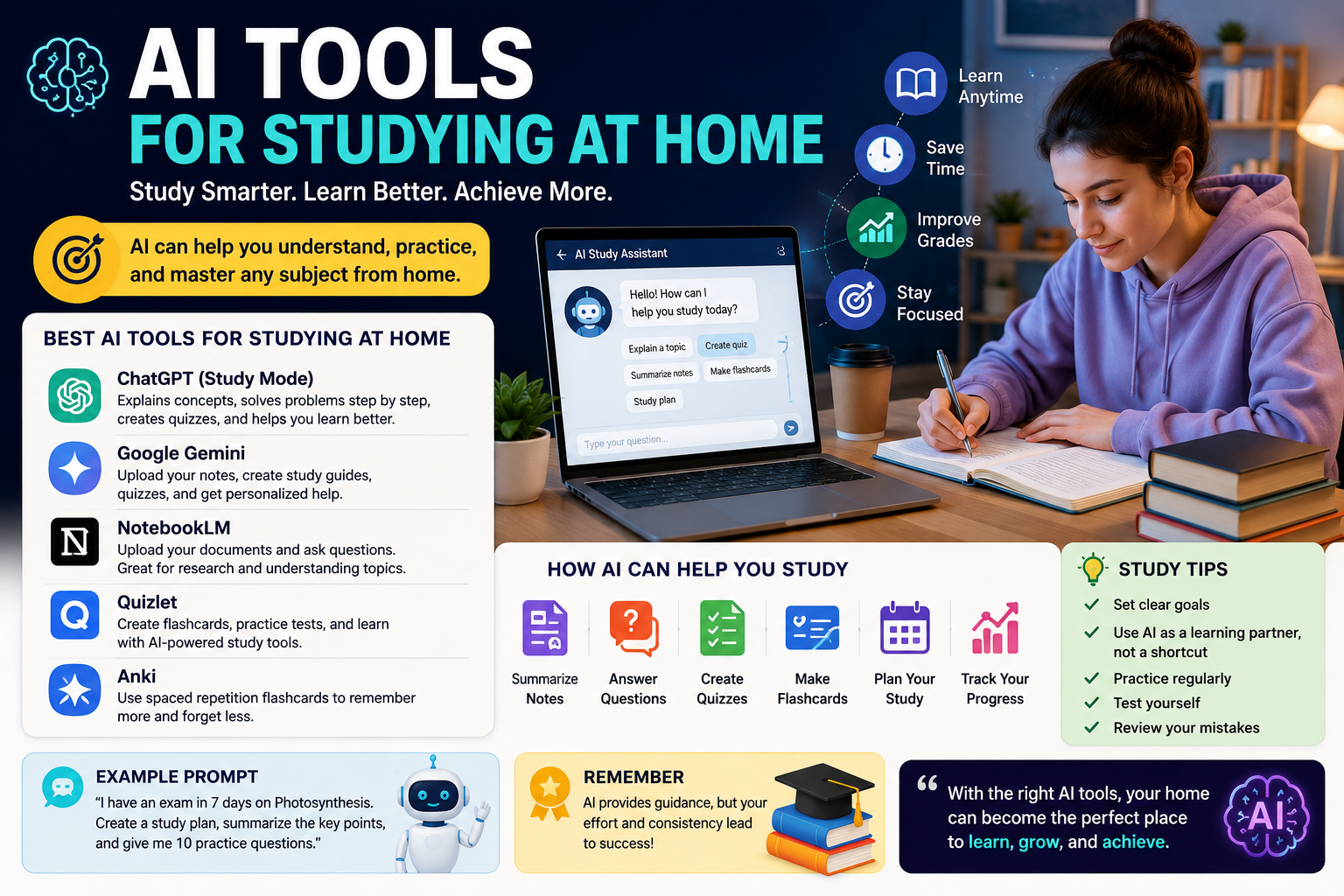
AI Tools for Studying at Home Studying at home can be convenient, but it also comes with challenges. Without a teacher sitting nearby, students may struggle to understand difficult topics, organize notes, prepare for exams, or stay focused. Fortunately, AI tools for studying at home are making independent learning easier and more interactive.
Artificial intelligence can now help students explain difficult concepts, summarize notes, create practice questions, organize study materials, generate flashcards, and build personalized study plans. Instead of simply providing an answer, newer AI learning tools can guide students through problems and help them understand why an answer is correct.
In 2026, tools such as ChatGPT Study Mode and Google’s Gemini study features are increasingly designed around active learning rather than simply generating answers. ChatGPT Study Mode, for example, can ask questions, provide hints, explain concepts step by step, and check a student’s understanding.
What Are AI Tools for Studying at Home?
AI study tools are applications that use artificial intelligence to support students with learning and academic tasks.
A student studying at home can use AI to turn class notes into a study guide, ask questions about a difficult chapter, create a practice test, summarize a long PDF, or receive a step-by-step explanation of a mathematics problem.
These tools are useful for students in high school, college, university, online courses, and self-learning programs.
The most useful AI study tools are not necessarily the ones that simply produce answers. Tools that encourage students to think, practice, and review can provide greater long-term value.
Why Use AI Tools for Studying at Home?
There are several reasons students are turning to AI for independent learning.
1. Get Help When a Teacher Is Not Available
One of the biggest advantages of studying at home is having access to on-demand assistance. If you get stuck on a difficult concept late at night, an AI study assistant can explain the topic using simpler language or a different example.
For example, you can ask:
“Explain photosynthesis as if I am a beginner, then give me a real-world example.”
If the first explanation is too difficult, you can ask for an even simpler explanation.
2. Create Personalized Study Plans
Every student learns differently. Some students need more time with basic concepts, while others need challenging practice questions.
AI can help create a study schedule based on your available time, subjects, exam date, and current knowledge.
For example:
“I have seven days before my biology exam. Create a two-hour-per-day study plan covering these five chapters and include a practice test on the final day.”
This turns a large amount of material into smaller, manageable tasks.
3. Summarize Long Notes
Students often have hundreds of pages of notes, slides, articles, and PDFs to review before an exam.
AI tools can help turn long materials into concise study guides.
Google’s Gemini study features allow students to upload course materials and create personalized study resources, while its study notebooks can use diagnostic quizzes and follow-up performance to adapt learning.
Best AI Tools for Studying at Home in 2026
Different AI tools are useful for different study tasks.
1. ChatGPT Study Mode
ChatGPT is one of the most flexible options for students. Its Study Mode is designed to encourage deeper understanding instead of immediately providing a final answer.
It can:
- Explain difficult concepts
- Ask guiding questions
- Help solve problems step by step
- Create quizzes
- Generate flashcard-style questions
- Review notes and PDFs
- Prepare students for exams
- Identify areas that need more practice
Students can upload course materials such as notes, worksheets, slides, PDFs, or images and ask the tool to help them study those materials.
This makes ChatGPT particularly useful for students studying independently at home.
2. Google Gemini
Google Gemini has also developed several features specifically for students.
Its study notebooks can use uploaded syllabi, notes, and reading materials to create personalized learning plans. Students can also use Gemini to create study guides, quizzes, flashcards, and other learning materials.
Gemini can be useful when you want to work directly with your own course materials instead of starting from a general question.
3. NotebookLM
NotebookLM is designed around source material. Students can provide documents and then ask questions about the information contained in those sources.
This can be useful when preparing for an exam because you can organize class notes, readings, and other course documents in one place and use AI to explore them.
Google’s 2026 student learning features also integrate study notebooks with NotebookLM, allowing students to continue working with course materials and create resources such as flashcards and visual learning materials.
4. Quizlet
Quizlet can be useful for students who prefer learning through flashcards and self-testing. AI-powered features can help transform learning materials into practice resources.
Self-testing is particularly important because reading the same notes repeatedly does not necessarily mean that you can recall the information during an exam.
5. Anki
Anki is well known for digital flashcards and spaced repetition. While it is not simply a chatbot, it can become a powerful part of an AI-supported study workflow.
Students can use AI to help create question-and-answer material and then review those cards using spaced repetition.
How AI Can Help With Different Subjects
AI tools can support almost any academic subject, although students should always verify important information.
Mathematics
AI can explain mathematical problems step by step rather than simply showing the final answer.
A useful prompt is:
“Show me how to solve this equation step by step, but don’t give me the final answer until I try it.”
This encourages actual learning.
Science
Students can ask AI to explain scientific processes using analogies, diagrams, or simple examples.
For example:
“Explain DNA replication for a high-school student and then give me five questions to test my understanding.”
History
AI can help organize historical events into timelines and compare causes, consequences, and important figures.
Writing
Students can use AI to brainstorm ideas, create outlines, identify unclear sentences, and improve grammar.
However, students should follow their school’s rules regarding AI use in assignments.
How to Use AI for Better Studying
Simply asking an AI tool to provide answers is not always the best approach.
A better method is to use AI as a personal tutor.
Step 1: Upload Your Materials
Start with your class notes, syllabus, textbook excerpts, slides, or worksheets when the tool supports file uploads.
Step 2: Ask for an Overview
Ask the AI to identify the most important concepts.
Step 3: Learn One Topic at a Time
Instead of asking for an enormous summary, study one section at a time.
Step 4: Ask for Questions
Request practice questions without answers.
Step 5: Test Yourself
Answer the questions yourself before asking AI for feedback.
Step 6: Review Your Mistakes
Ask the AI to explain why an answer was incorrect and give you another similar problem.
Step 7: Repeat
Continue the cycle of learning, practicing, testing, and reviewing.
This approach makes AI a learning partner rather than an answer generator.
Example Prompts for AI Studying
Students can use prompts like these:
For beginners:
“Explain this topic in very simple English and give me three real-world examples.”
For exam preparation:
“I have an exam in five days. Create a study plan using these chapters and give me a short quiz every day.”
For mathematics:
“Give me one similar problem to solve myself. Don’t show the answer until I respond.”
For revision:
“Turn these notes into 20 flashcards and 10 multiple-choice questions.”
For weak areas:
“I got these five questions wrong. Identify the concepts I don’t understand and create a short lesson to help me improve.”
Benefits of AI Tools for Studying at Home
The biggest advantages include:
- 24/7 access to learning assistance
- Personalized explanations
- Faster revision
- Automated practice questions
- Easier note organization
- Personalized study plans
- Help with difficult concepts
- Interactive learning
- Support for independent students
- Multiple ways to learn the same topic
AI can also make studying more engaging by turning passive reading into quizzes, discussions, practice problems, and interactive lessons.
Limitations and Risks
AI is powerful, but it should not be treated as a perfect teacher.
AI systems can make mistakes, misunderstand questions, or provide incorrect information. Students should verify important facts against textbooks, class materials, teachers, or reliable sources.
ChatGPT’s own Study Mode documentation warns that the system can make mistakes and recommends checking important information.
Students should also avoid using AI to simply complete every assignment. If you let AI do all the thinking, you may finish homework faster but understand less.
The best approach is to ask for explanations, hints, practice questions, and feedback before asking for a complete solution.
Are AI Study Tools Free?
Some AI study tools provide free access, while others offer a mixture of free and paid features. Availability, limits, and pricing can change over time.
For example, ChatGPT Study Mode is available across ChatGPT plans, while Gemini provides free AI access alongside additional paid options and student-specific offerings in eligible locations.
Students should always check the current terms before depending on a particular feature for an important exam.
Frequently Asked Questions
What are the best AI tools for studying at home?
ChatGPT Study Mode, Google Gemini, NotebookLM, Quizlet, and Anki can all be useful, but the best option depends on whether you need explanations, document analysis, flashcards, or self-testing.
Can AI create a study plan?
Yes. You can provide your subjects, exam date, available study time, and learning goals and ask an AI tool to create a personalized schedule.
Can AI summarize class notes?
Yes. When file uploads are supported, students can upload notes or other course materials and ask AI to create summaries, study guides, questions, or flashcards.
Should students use AI for homework?
AI can be useful for understanding homework, but students should follow their school’s AI policies. Using AI as a tutor or for explanations is generally more educational than simply copying its answers.
Can AI replace a teacher?
No. AI can provide explanations and practice, but teachers offer context, professional judgment, feedback, classroom interaction, and support that AI cannot fully replace.
Final Thoughts
AI tools for studying at home can make independent learning faster, more flexible, and more personalized. Instead of spending hours rereading the same notes, students can use AI to create study guides, practice questions, flashcards, explanations, and personalized learning plans.
The most effective strategy is to use AI actively. Ask questions, attempt problems yourself, take quizzes, review mistakes, and use your course materials as the foundation for learning.
In 2026, AI is becoming a useful study companion for students who want extra support outside the classroom. However, the goal should not be to let AI do the learning for you. The goal is to use AI to understand more, practice better, and become a more independent learner. // editer. cloudmagz
[…] goal is not to publish hundreds of generic AI-generated posts. Instead, businesses can use AI to create a first draft and then add their own experience, brand voice, and […]