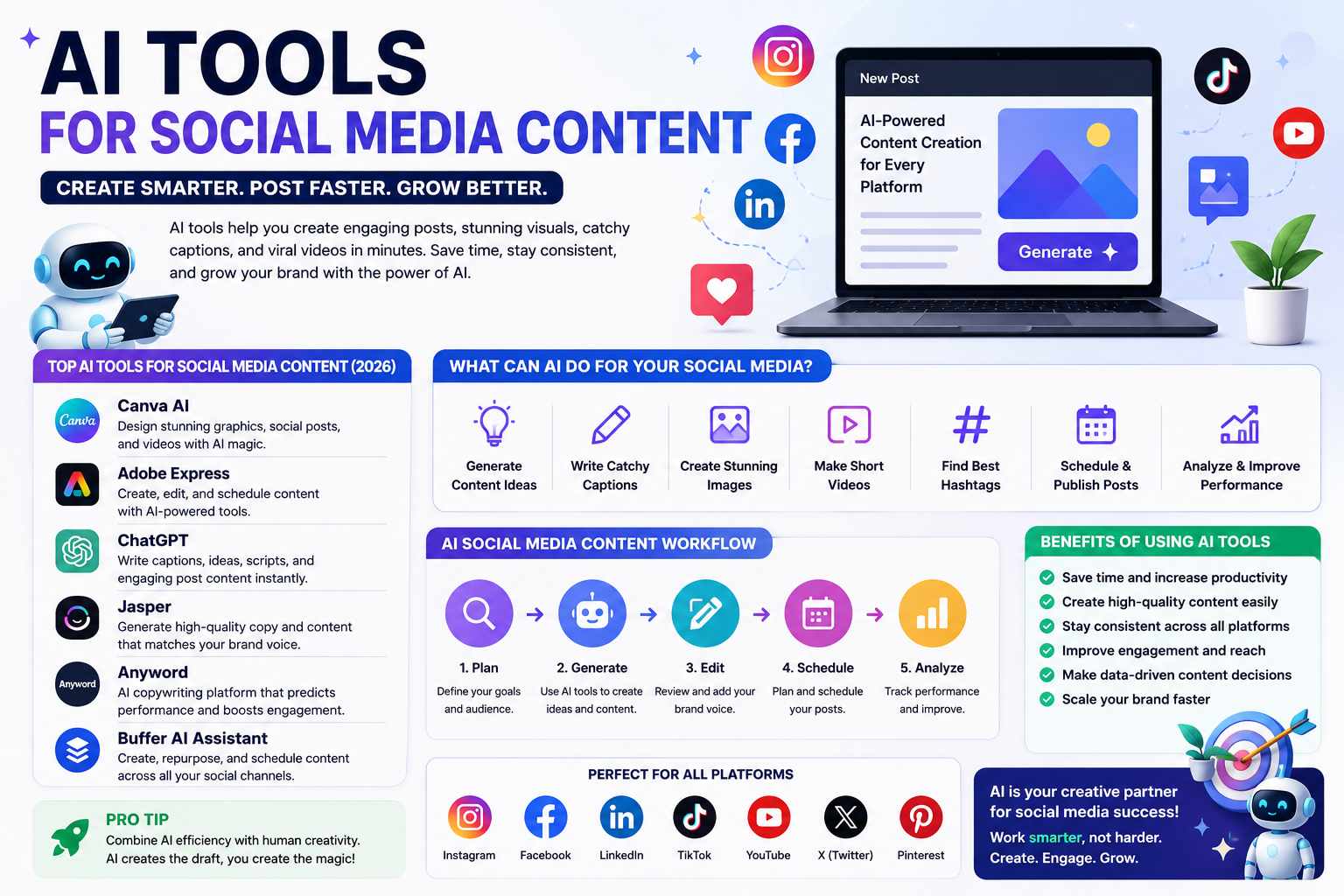
AI Tools for Social Media Content consistently can be challenging. Businesses, influencers, bloggers, and creators need fresh ideas, engaging captions, attractive images, short videos, and regular posts for multiple platforms. Doing everything manually can take several hours every week.
This is where AI tools for social media content can make a major difference.
Artificial intelligence can now help with brainstorming, caption writing, image creation, video editing, content repurposing, hashtag suggestions, scheduling, and social media planning. Instead of replacing creativity, AI can handle repetitive tasks and give creators more time to focus on their audience and strategy.
In 2026, AI-powered social media platforms are becoming more integrated. Many tools combine content creation, design, scheduling, and analytics rather than requiring users to switch between several different applications.
AI tools for social media content are applications that use artificial intelligence to help create, edit, optimize, publish, or manage social media posts.
Depending on the platform, an AI tool can help you:
- Generate post ideas
- Write captions
- Create social media images
- Generate short videos
- Rewrite existing content
- Create hashtags
- Repurpose blog posts
- Create content calendars
- Schedule posts
- Improve social media copy
- Analyze content performance
- Adapt content for different platforms
For example, you could provide an AI tool with a blog article and ask it to create an Instagram caption, LinkedIn post, Facebook update, and short-video script based on the same information.
This can significantly reduce the amount of manual work involved in content marketing.
Social media rewards consistency, but creating quality content every day is difficult.
A business might need to publish several posts every week while also managing customers, products, emails, and other marketing activities. AI can help reduce the time required for content production.
Adobe Express, for example, describes AI as a way to support content ideation, captions, visuals, scheduling, and other social media tasks.
The goal is not to publish hundreds of generic AI-generated posts. Instead, businesses can use AI to create a first draft and then add their own experience, brand voice, and ideas.
Different AI platforms are designed for different tasks. Some are better for writing, while others focus on design, video, or scheduling.
1. Canva
Canva is one of the most useful options for creators who want to design social media content without advanced graphic-design skills.
Its AI-powered features can help generate designs, images, layouts, and other visual assets. Canva also makes it easier to resize and adapt content for different social platforms.
According to Hootsuite’s 2026 comparison, Canva’s Magic Studio is particularly useful for solo marketers and small teams creating social visuals without a dedicated designer.
Canva is a good choice for:
- Instagram posts
- Instagram Stories
- Facebook graphics
- LinkedIn posts
- YouTube thumbnails
- Short videos
- Promotional graphics
- Social media carousels
2. Adobe Express
Adobe Express combines design tools, templates, AI features, and social media publishing.
Its AI capabilities can generate images and templates from text prompts, while its social media tools can help creators produce content for different platforms. Adobe Express also offers AI caption generation and scheduling features.
The platform supports social channels including Instagram, Facebook, LinkedIn, TikTok, Pinterest, YouTube, and X through its Content Scheduler.
This makes Adobe Express useful when you want to create and schedule content from one place.
3. ChatGPT
ChatGPT can be used as a general-purpose social media content assistant.
You can ask it to generate:
- Social media ideas
- Captions
- Video scripts
- Content calendars
- Product descriptions
- Promotional posts
- LinkedIn posts
- Instagram captions
- Facebook content
- Questions for audience engagement
For example, you could provide information about your business and ask:
“Create 10 Instagram post ideas for a small technology business targeting U.S. customers. Make each idea educational and engaging.”
You can then select the best ideas and turn them into finished posts.
4. Jasper
Jasper is designed primarily for marketing and content creation. It can be useful for businesses that need consistent brand messaging across multiple marketing channels.
Hootsuite’s 2026 roundup identifies Jasper as a strong option for enterprise marketing teams working across brands and regions.
It can be particularly useful for larger marketing operations where brand voice and consistency are important.
5. Anyword
Anyword focuses heavily on marketing copy and performance-oriented content.
It can help marketers generate and compare different versions of social media copy. This can be useful when you want to test different headlines, calls to action, or promotional messages.
Hootsuite’s 2026 review highlights Anyword’s ability to score copy variations based on expected engagement and conversion performance.
AI can help throughout the entire content-production process.
Generate Content Ideas
Writer’s block is one of the biggest problems for social media creators.
AI can generate topic ideas based on your industry, audience, products, and goals.
For example, a fitness business could ask for:
- 20 educational post ideas
- 10 motivational posts
- 10 customer-question posts
- 5 short-video concepts
- 10 seasonal campaign ideas
You can then select the strongest ideas rather than starting from a blank page.
Write Captions
Writing captions for every post can take considerable time.
AI can create an initial caption based on your image, topic, or product.
Adobe Express, for example, can generate captions from a brief description and can also use visual context from an uploaded image. Users can then rewrite, shorten, or lengthen the generated caption.
However, always review AI-generated captions before publishing them.
Create Images
AI image generators allow creators to produce original visual concepts from text prompts.
For example:
“Create a modern technology-themed Instagram graphic showing a laptop, artificial intelligence icons, and a futuristic workspace.”
The resulting image can then be customized with your brand colors, logo, and text.
Create Short Videos
Short-form video has become an important part of social media marketing.
AI can help generate video ideas, write scripts, create visuals, add captions, remove backgrounds, and assist with editing.
Even when AI does not create the entire video, it can reduce the amount of manual editing required.
Repurpose Existing Content
One of the smartest ways to use AI is content repurposing.
Suppose you have a 1,500-word blog post. Instead of creating completely new content for every platform, AI can transform that article into:
- 5 Instagram posts
- 3 LinkedIn posts
- 5 Facebook posts
- A short-video script
- An email newsletter
- A carousel outline
- Several short quotes
This allows one piece of content to support an entire social media campaign.
A simple workflow can make AI much more useful.
Step 1: Define Your Audience
Before creating content, understand who you want to reach.
Consider their age, location, interests, problems, and goals.
Step 2: Choose Your Platforms
Do not automatically publish identical content everywhere.
Instagram may require visual content, while LinkedIn may work better with professional insights. TikTok and YouTube Shorts are more focused on video.
Step 3: Generate Ideas
Use AI to create a list of topics based on your audience and business.
Step 4: Create the Content
Use AI to create captions, images, scripts, or videos.
Step 5: Add Your Brand Voice
This step is extremely important.
AI-generated content can sound generic. Add your own personality, examples, opinions, experience, and brand terminology.
Step 6: Edit and Fact-Check
Check every important claim, statistic, product detail, price, and date.
Step 7: Schedule Posts
Scheduling tools can help you maintain consistency.
Adobe Express Content Scheduler, for example, allows users to select social channels, add captions, choose a future date and time, and schedule or publish content.
Step 8: Analyze Results
Track engagement, clicks, comments, shares, saves, and conversions.
Use these results to understand what your audience actually wants.
The biggest benefits include:
Save time: AI can reduce the time spent on repetitive writing and design tasks.
Generate more ideas: Creators can quickly overcome writer’s block.
Improve consistency: Content calendars and AI-assisted workflows make regular publishing easier.
Create better visuals: AI design features can help beginners create professional-looking graphics.
Repurpose content: One article or video can become multiple social media assets.
Support small businesses: Small teams can produce more content without hiring a large creative department.
Some AI tools offer free plans, while others provide limited AI features before requiring a subscription.
For example, Adobe Express offers a free social media post maker and provides AI-powered creation features, while advanced capabilities may depend on the plan or available generative credits.
Free tools can be enough for beginners and small creators, while larger businesses may benefit from paid platforms with advanced scheduling, analytics, collaboration, and brand-management features.
AI is useful, but it should not completely replace human creativity.
AI-generated content can sometimes sound repetitive, use incorrect information, misunderstand context, or create visuals with unwanted details.
Another problem is sameness. If thousands of businesses use similar AI prompts, their content may start to look and sound alike.
The solution is to use AI for assistance rather than complete automation.
Give AI detailed information about your audience and brand, then edit the result before publishing.
Tips for Getting Better Results From AI
Use specific prompts instead of simple instructions.
Instead of:
“Write an Instagram post.”
Try:
“Write a friendly Instagram caption for a U.S.-based technology website. Explain three simple AI productivity tips for college students. Keep it under 120 words and end with a question that encourages comments.”
The more useful context you provide, the more relevant the result is likely to be.
Also create a consistent brand voice. Tell your AI tool whether your brand should sound professional, friendly, humorous, educational, or conversational.
Frequently Asked Questions
Canva and Adobe Express are strong choices for visual content, while ChatGPT is useful for ideas, captions, scripts, and content planning. Jasper and Anyword are more focused on marketing content and copy.
Yes. Depending on the platform, AI can help generate text, images, videos, captions, and scheduling information. However, human review is recommended before publishing.
Yes. AI can adapt the same idea into different formats for Instagram, Facebook, LinkedIn, TikTok, YouTube, and other platforms. The content should still be adjusted to match the style and audience of each platform.
It can be very useful when combined with human editing and a clear brand strategy. AI is best used to increase productivity rather than replace the business’s unique voice.
Final Thoughts
AI tools for social media content are becoming an important part of modern digital marketing. They can help creators and businesses brainstorm ideas, write captions, create images, produce videos, repurpose existing content, and schedule posts.
The best approach is to combine AI efficiency with human creativity. Use AI to handle repetitive work, but add your own experience, personality, brand voice, and knowledge before publishing.
In 2026, the most effective social media strategy is not simply about creating more content. It is about creating useful, relevant, original, and consistent content more efficiently. With the right AI tools and a thoughtful workflow, even a small team or individual creator can build a strong social media presence. // editer cloudmagz
[…] a professional LinkedIn post, and a promotional Facebook message. AI can help adapt the same basic information to each platform, leaving you more time to check the quality and interact with your audience. You should still […]